Showing posts with label malware. Show all posts

Tuesday, August 21, 2018

CrowdStrike donates Falcon MalQuery for rapid YARA hunts to the HA Community

We all know that YARA rules are the pattern matching swiss knife in many ways and have become the de-facto standard when it comes to detection and attributing new malware variants to previously known threats. One great example of this is WannaCry. Within days of that outbreak last year, Google’s Neel Mehta [1] was able to find code similarities between WannaCry code and previously attributed North Korean malware.

Over the past year, the HA community platform has not only been growing at an incredible rate, but also accumulated an amazing collective knowledge (on a side note: thank you, everyone!) due to Falcon Sandbox and many integrations extracting more IOCs than any other community service. Futhermore, to make it easier to help grow the collective community database, we published a new APIv2 with a modern tooling page that acknowledges privacy concerns and is state of the art.

With a growing set of data, having a technology to quickly and accurately search through this data turns a swiss knife to life. Let's imagine we could take any YARA rule or string/binary pattern and scan through petabytes of data within minutes vs. having to wait multiple hours on a batch job to complete? Let's imagine the search results could be downloaded, shared and used to easily determine efficacy and attribution? All within an open and transparent environment that benefits the whole community? Wait, what? This seems too good to be true.

Sometimes dreams come true. ;) Today, we are announcing a revoluationary new search capability to our Hybrid Analysis community platform, which has been implemented as part of a powerful new YARA hunt and binary pattern search capability. Including custom search filters (e.g. date ranges) and efficacy evaluation over petabytes of data. In order to facilitate this type of research by the security community, CrowdStrike has donated Falcon MalQuery, its rapid malware search engine technology, to the community.

Real World YARA Hunting


Let's take a look at how we can utilize the new feature. Let's take a look at the new front page of HA, which contains two new tabs "YARA Search" and "String Search" (for string/binary patterns):-


At this point, you can either navigate directly to the "Advanced Search" form (using the button), drag & drop a YARA rule (from a text file) or paste (CTRL-V) clipboard text containing a YARA rule.

Providing a valid YARA rule takes the user to the following search form/page:-


At this page, it is possible to "refine" the search through a variety of criterias, e.g. the file type(s) to require (in the search result set), as well as date and file size ranges.

After performing the hunt (in this case a RAT of the Lazarus Group), a list of matched HA Community Files is presented, including links to the respective reports and a collective IOC download (via CSV):-


Happy hunting!

Source: https://www.hybrid-analysis.com/string-search/results/3530edadd82a867e3a35f4b26d8f85b5e82eb67d4b759cc1f77d2f499571cf59

[1] https://twitter.com/neelmehta/status/864164081116225536?s=21

Sunday, July 3, 2016

Financial malware delivered via embedded JSE

Just a few days ago our research lead came accross an interesting office file. Instead of the common macro malware everyone sees today (which is as old as the 90's, albeit still successful), the sample we were looking at was using an interesting way to bypass automated detection: the Office file contained an additional embedded file, which needs to be launched "manually" (double-click) and at first sight of the icon seemed to be an Excel sheet.


As the "follow the instructions" type of prompts are usually a dead give-away for malware (amazing that these things still work), we decided to take take a deeper look and see if we might possibly learn a lesson and improve our own automated malware analysis system. What made the file even more interesting is that it was bypassing all major sandbox vendors (including our own, to be fair) and had a very low AV detection rate. Nevertheless, it did have AV detection, which - by the way - is a strong statement in our opinion and underlines that leading AV technology is still very important, at the very minimum as an initial filtering mechanism.

... but enough of the ramblings, let's get down to the nitty-gritty. ;-)


Initial Assessment


As a first (manual) step, we took a brief look at the Word file structure.


The embedded 'oleObject1.bin' file is the 'Excel file' that one can observe when opening the Word file (see first screenshot of this blogpost). Let's take a brief look at it:


... aha! The file contains a Javascript Encoded (.jse) file reference. You can either drag & drop the embedded 'Excel sheet' from the Office file or take a closer look at the binary contents to find the encoded javascript.


Obviously, the embedded JSE is very difficult to parse statically and does a good job at hiding IOCs. The random dictionairy comment (see the "/* */" in the above image that encapsulate a large chunk of white noise, most likely to create an acceptable valid vs. junk character ratio to bypass heuristic AV thresholds).


Improved Sandbox Results


Let's skip forward two days and take a look at our optimized VxStream Sandbox report for the file. As of v4.4.0, we successfully extract embedded .jse/.vbe files from Office files and execute them on the target system as well as decode them automatically and try to extract IOCs from the decoded (and partially deobfuscated) version of the script(s). Here are the results:

Launching the embedded JSE on the Windows guest

Decoded JSE available for D/L

 Taking a peek into the decoded JSE

Extracting the IOC from the "IP address" Behavior Indicator


Conclusion 


The file we reviewed in this blogpost demonstrates that malware groups are very agile and remain 'creative' at bypassing security systems, especially automated sandbox systems. This underlines the importance of having an agile sandbox framework to quickly adapt to new techniques, but also shows that awareness of sandbox systems is growing. In this specific case, a clever mix of social engineering tricks (the fake 'Excel sheet' icon), added white noise (the legitimate string data) and an uncommon trigger (human interaction required to double-click the embedded file; no usage of macros) as well as the more hideous JSE was observed. It is a prime example to show that it is not enough to simply execute a file in a sandbox environment. Instead, at the very minimum, a carefully crafted mixture of static and dynamic analysis techniques is necessary to stay on par with latest malware evolution. A broad term we defined at Payload Security for the combination of static and dynamic analysis techniques is Hybrid Analysis.

(1) VxStream Sandbox Report: https://www.hybrid-analysis.com/sample/4fd53f748006c7f7729cd3360ec8a9a50740e253cb2583f5330fd5e35b64cb04?environmentId=100
(2) Dropped Gozi Report: https://www.hybrid-analysis.com/sample/d945dcd6e3c1e3bff7536d5cf099780d9fdc7ad9efa31752e7b287dce66b194b?environmentId=100

UPDATE


We were made aware of the following excellent blogpost  that outlines a quite similar attack, but instead of using an embedded JSE camouflaged as an Excel sheet, a batch file launching Powershell with a Base64 encoded "dropper commandline" was observed. We filled our coffee cups and made a small night session to accomodate for any kind of embedded file type. Here are some impressions:


 Targetted Powershell Attack

 Improved VxStream Sandbox Report


Wednesday, July 8, 2015

Walking through a report of Win32/Rioselx.B

This time our blogpost will demonstrate a pretty nice report (VT at 6/54) our sandbox VxStream generated for an Angler related artifact that is classified as Rioselx.B by ESET (Baidu seems to have adopted the same name for some odd reason). Artifact name found in the context: Angler_5_770_0.bin_


Walking through the report


Note: if you want to follow our analysis in a second screen, scroll to the bottom for links.

What we like to do when looking at a report first is to start in a top-down approach, i.e. we start looking at the malicious signatures first. We quickly understand how the malware propagates:


... using the known QueueApcThread method.

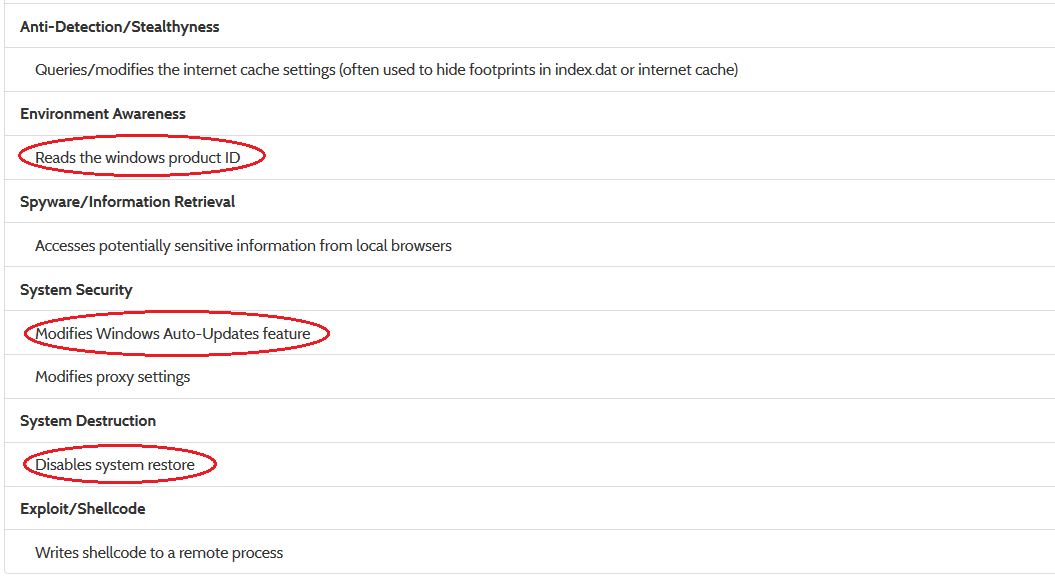
We understand that it tries to fingerprint the system, lowers the security and tries to avoid being deleted through a rollback (disabling auto-update, disabling system restore):


Now, of course, it depends on whether we are interested in simply understand that this is something we don't want to execute (in that case, we are done already), but extract indicators that we could use to feed into external systems, update security rules or generate signatures. In the latter case, the 'Writes shellcode to a remote process' seems promising.

Taking a look at the process tree (scroll down to 'Hybrid Analysis' on the right-side menu), we identify that only one process contains Stream or Shellcode Stream (disassembly listings) data:


Taking us to the next screen:


Here we marked a possible unique string identifier for this sample that could be used for YARA signatures:'@grcuk24/ghn' --- a brief query on our favorite DBs might confirm this.

Taking a look at the network traffic gives a good overview of domains/IPs you might want to blacklist. As they have only been seen in the overall webservice network traffic analysis 2 times, it is another indicator that we are not looking at 'white-noise' traffic.


 If we scroll beyond the network section, we find the Strings tab. Hit the 'Details' button to see extended information on the encoding (Ansi/Unicode) and where the string was obtained from (e.g. a runtime API parameter, binary scan, memory dump): 


In the 'All Strings' tab relatively far at the top we find two interesting strings that might be an obfuscated IP address. At least the string "89, 143, 187, 66" (which looks oddly much like an IP address, if you substitute the ", " with a "." dot character). It seems to resolve to Slovenia now and shows no malicious context on VirusTotal.

Checking out the 'Dropped Files' section of the kernelmode monitor report, we can detect additional artifacts being dropped that are also marked as malicious on VirusTotal as 'Chgt.O' (again: hit the 'Details' button to see the hash values for dropped files).

 Note: all dropped files are checked against VirusTotal


More PE fun

If you scroll back to the 'File Details' tab and click on the 'Visualization (PortEx)' link, that takes us to a PE Layout visualization that is often overlooked. This is actually also a nice way to detect some interesting and malicious code locations.


The 'PE Layout' screen is a split-screen. On the left side is the 'entropy' of the PE file (i.e. the darker the spots, the higher the entropy; the higher the entropy, the more random the bytes in the sequence are; the higher the randomness, the more probable is the presence of packed/compressed data). The right hand side shows the general PE layout (see the legend on the very right), the entrypoint is marked with a small red dot, the import section in purple/pink, the resource section in green. We've highlighted the packed regions: what's suspicious is that there seems to be packed code following the entrypoint, between the import/resource section and as a possible overlay at the very end beyond the resource section. Of course, only a manual analysis can give more insights into these areas, but that is beyond the scope of the report.


Final Words

With this blogpost we hopefully gave more insights into how one can go about reading a report. Of course, there is a lot more you could do (like download and analyze the PCAP file, etc.), but we covered the basics. The standalone version comes with XML reports, an API and many other things that are more suitable for an integration of the sandbox in larger automated systems (more information).

Here is a link to the sample (also available at the top of the report). Please do try it on your favorite sandbox/security solution and we'd be happy to get some feedback at info@payload-security.com on how your experience was.


References

Here's the report on Windows 7 32-bit using our usermode technology: Click
This is the report on Windows 7 32-bit using our kernelmode technology: Click

Both of the reports are pretty much identical, which is a good indicator as to how strong the usermode anti-detection technology is, because the kernelmode monitor is far less prune to being detected (as the malware process remains untampered).

Thursday, May 21, 2015

Improved PDF analysis and Windows 10 Preview

Today we made another 'technological leap' with VxStream Sandbox related to PDF analysis. As most of you surely know, PDF phishing campaigns are a very popular attack vector (invoice/mail tracking PDF with a link to the malicious file). The new version of VxStream is capable of parsing PDF file structure and pulls out URLs it finds. Not only that, but it will also download files at the URLs and execute them if they are supported by the environment. If the downloaded file is a zip archive, it will even unpack it before analysis. Sounds good? :) It is!

Anyway, the feature is very new and does not work with the 'Stealthy Mode' yet, so you may have mixed experiences. The online service is updated with it and here is a first report of a PDF file that ran with the new feature:


Please take note of three things:
  1. The signature 'The input sample dropped a file that was identified as malicious' (that's the .exe file behind the malicious URL)
  2. The signature 'Found potential URL in binary/memory', which contains the malicious URL (it's still online, so beware; hxxp://www.sarnfields.co.uk/mcP5sr8XS4)
  3. The dropped file was actually executed (see 'Hybrid Analysis' section, click on the process)
The sample is available for download at the report (see link at the top)
SHA256: 11edf9436a9205c88c2a815cf6ebfb0a7a42eb150a2649766b3bb30350ee35ed

Windows 10 Insider Preview

Another part we have been working on (but not on the public servers yet) is Windows 10 compatibility. Here is a first run of the latest benchmark tool 'Pafish' on Windows 10 'Insider Preview':


The new background image is really cool, don't you think? :-)

Tuesday, May 5, 2015

Technology Boost: introducing 'Stealthy Mode' monitor engine and Single-File HTML Reports

today is a big release day with two new major features that we worked on over the past 9-10 months, which are also available on our online webservice at http://www.hybrid-analysis.com right now.

Kernelmode Monitor

You can now chose a 'Stealthy Mode' environment, which is a completely new monitoring technology that leaves the malware sample untampered. Basically, a lot of sandbox systems and even AV products (see this blogpost: http://rce.co/why-usermode-hooking-sucks-bypassing-comodo-internet-security/) rely on injecting and tampering with processes in userland. With the new 'Stealthy Mode' of VxStream Sandbox the sample is executed untampered and observed from the operating system level, which is far less detectable. Our new technology is a milestone and takes VxStream to a level that is only matched by very few competitors on the market.

Note: choose the W7 32 bit 'Stealthy Mode' environment upon submission to try it out

Of course, we still do memory dumps of the analyzed processes so that the reports benefit from Hybrid Analysis technology. Essentially, you will not notice much difference between the usermode and kernelmode monitor, except that certain specific malware samples that are aware of their memory image tampering will run a lot better under 'Stealthy Mode'. Also, the new kernelmode monitor comes with some basic anti-VM detection technology just like the usermode monitor.


The above picture is taken from a sample report running the known 'Pafish' benchmark (v0.4) with the new kernelmode monitor: https://www.hybrid-analysis.com/sample/bf0bbd28deed92fbd9f974e63336c2a4185a07ed19c578a37885d351134c0182/?environmentId=4

Single-File HTML Reports

It is now possible to 'persist' and download single-file HTML reports for any analysis report generated as-of now. This is another feature we have been working on and the HTML reports are generated based off of the XML reports and completely separate from the online reports (which are just a view on JSON documents stored in a MongoDB). The HTML reports are nice, if you want to share or keep a report. It is not as complete as the online reports yet, but also contains a few other details (such as the exact VT results).


Sample HTML report hosted at our company site: here
Corresponding Hybrid-Analysis.com report: here

Of course, we will be extending and working on both of these two new code 'projects' over the coming months, so stay tuned.

// EOF


It is possible to license VxStream Sandbox and run it on-premise

If you are interested in licensing the full version of VxStream Sandbox (includes the web application to run your own service, an API, the runtime monitor, the load balancing controller, hybrid analysis technology, report generator, all behavior signatures, scripts, etc.) or have any questions, please use our contact form and get in touch. We have a very simple licensing structure and additional options. If you are interested in a demo, try out our free malware analysis service at hybrid-analysis.com.