Tuesday, September 24, 2024

Analyzing the Newest Turla Backdoor Through the Eyes of Hybrid Analysis

 Author: Vlad Pasca

  • A Hybrid Analysis perspective and deep technical dive into the new Turla APT backdoor 

  • Turla starts its attack by using shortcut files to infect victims 

  • Evasion techniques employed by the group involve unhooking and disabling ETW and AMSI for stealth

  • Backdoor implements custom commands for execution of malicious PowerShell scripts and file creation


In a recent campaign, the Russian APT group Turla (also known as Venomous Bear), used shortcut files (.lnk) to infect systems with a fileless backdoor. The malware employs multiple evasion techniques such as disabling ETW and AMSI, and unhooking. Our contribution to existing research consists of analyzing the backdoor from a Hybrid Analysis perspective and presenting the implementation of the malicious routines. We will present the deobfuscation process and perform a complete technical analysis of the malware that reveals its functionalities. 

A Hybrid Analysis Perspective


Turla’s backdoor was obfuscated using the “SmartAssembly” obfuscator to complicate the analysis. It implements evasion techniques to extend malicious activity and influence the logging process. The backdoor commands can be used to create new files and run malicious PowerShell scripts using PowerShell runspaces.


We’ve analyzed an attack that started with a shortcut file called “Advisory23-UCDMS04-11-01.pdf.lnk” detonated via Hybrid Analysis. As shown in Figure 1, the file’s icon is set to PDF in order to trick the user. 

Figure 1 - PDF icon set

However, a legitimate PDF called “Advisory23-UCDMS04-11-01.pdf” is displayed during the execution, as seen in the runtime screenshots from the Hybrid Analysis detonation report:


Figure 2 - Legitimate PDF displayed


The detonation report also displays the process tree (Figure 3 ) showing that the initial process creates a file called “ChromeConnection” in the temporary folder. This is executed using the MSBuild tool:

Figure 3 - Process tree

The final payload is a fileless backdoor. The sample executes the Main function of the backdoor with six custom parameters. The presence of these six custom parameters is highly suspicious and should be a first red flag for taking a closer look at this sample. We could identify this operation in the “Extracted Strings” section of the Hybrid Analysis report (see Figure 4).

Figure 4 - Final backdoor is executed with 6 parameters 

As shown below, the PDF and the created file can be downloaded from the “Extracted Files” section of the report.


Figure 5 - Extracted Files section on Hybrid Analysis

A Deep Dive into The Dropper

Based on these observations, we are able to  determine that the fileless backdoor is worth a deeper investigation. After finding the final dropped file (SHA256: 7091ce97fb5906680c1b09558bafdf9681a81f5f524677b90fd0f7fc0a05bc00) we can download it locally and analyze it using PEStudio. We determine that the sample is a .NET executable obfuscated using the “SmartAssembly” obfuscator (Figure 6).

Figure 6 - PEStudio detects the SmartAssembly obfuscator

Dumbassembly performs initial deobfuscation operations on the malware (Figure 7).

Figure 7 - Dumbassembly tool deobfuscates the backdoor

Simple Assembly Explorer is  used to further deobfuscate the resulting executable, as highlighted in Figure 8.

Figure 8 - Simple Assembly Explorer options

It’s very important that we use the right options for deobfuscating the code.  

Finally, de4dot is used to restore the remaining obfuscated code, as displayed in Figure 9 and Figure 10 below, which shows the difference between the decompiled codes. 

Figure 9 - Before deobfuscation

Figure 10 - After deobfuscation

The process creates a mutex called “{C916E9A6-EEDF-4648-9A29-9E5713F4E79A}” to ensure that only one copy of the malware is running at a single time.


The first three parameters passed to the program are Base64-decoded and then decrypted using the XOR operator, with the first byte representing the key. 

Figure 11 - Parameters are passed to the decryption function

Figure 12 - Implementation of the operations

We’ve developed a custom Python script that decrypts the required parameters. The C2 server https[:]//files.philbendeck[.]com is revealed after the decryption. 

The last three parameters are used to compute the receive timeout, sleep time, and reconnect timeout, respectively. The default values are 30 seconds for the first two and 30 minutes for the third.

Figure 13 - Last parameters are used to compute the timeouts

The malicious process obtains the network interfaces on the local computer via a function call to GetAllNetworkInterfaces, and then extracts the MAC address. The address is modified to delete the “-“ character and the result is concatenated with the first parameter previously decrypted (Figure 14).

Figure 14 - MAC address extraction

The value computed above is XOR-ed with a randomly generated byte and stored in a variable called “strEncodedID”. This is used to compute a unique identifier of the infected machine.
Figure 15 - Unique identifier stored in strEncodedID variable
The following DLLs are mapped to memory: ntdll.dll, KernelBase.dll, and kernel32.dll. The purpose of this operation is to bypass hooks that might have been installed, by mapping “fresh” (not hooked) DLLs to replace the .text hooked sections with the clean ones . To accomplish that, the memory protections of .text sections of the loaded DLLs need to be changed to 0x40 (PAGE_EXECUTE_READWRITE) using VirtualProtect (Figure 16).


Figure 16 - DLLs that will be mapped

Figure 17 - Windows APIs used for mapping


Figure 18 - Memory protection changed using VirtualProtect

The MAC address concatenated with the first parameter described before is set to be an AES-128 key that will be used in upcoming C2 communication activities (Figure 19).

Figure 19 - AES algorithm initialization
The hostname and username are retrieved and encrypted using the AES algorithm. The result is Base64-encoded and exfiltrated to the C2 server using a POST request (see Figure 20 and Figure 21).

Figure 20 - Create a POST request to the C2 server

Figure 21 - AES encryption and Base64 encoding

The process reads the server’s response by calling the GetResponse method. It expects 38 bytes in the response (Figure 22).
Figure 22 - Server’s response is read and verified

If any exception occurs, the binary Base64-encodes the hostname concatenated with the username, and downloads a resource from the C2 server based on the “search=” parameter, as shown below.

Figure 23 - Download a resource if any exception occurs

The value “strEncodedID” is encrypted using the AES algorithm and Base64-encoded. The encrypted data is sent to the C2 server (Figure 24).
Figure 24 - Exfiltration of the unique strEncodedID identifier

The value computed above is XOR-ed with a randomly generated byte and stored in a variable called “strEncodedID”. This is used to compute a unique identifier of the infected machine.
The server’s response is decrypted and Base64-decoded. The structure of the result is “value1|value2|…”, where the first value is the command to be executed and the remaining values represent the required parameters.
Figure 25 - Server’s response contains the command to be executed

Turla’s process of encrypting communication between the victim and C2 is a sophisticated attempt to avoid detection by automated cybersecurity solutions and SecOps teams. This method of hiding communications and the exchange between victim and C2 makes the attack very difficult to discover and analyze, even by defenders employing networking tools.  

Custom Backdoor Commands


“uf” command


This command is used to create a new file and populates it with content received from the C2 server. The first parameter is the file path and the second parameter represents the file’s content that is Base64-decoded before being written (Figure 26).

Figure 26 - A new file is created and written on it


“op” command

The command has three subcommands: “rct”, “st” and “rt”. It’s used to modify the reconnect timeout, sleep time, and receive timeout, respectively.

Figure 27 - Reconnect timeout is changed

“cps” command

The process closes a PowerShell Runspace using the Runspace.Close function:

Figure 28 - Close a PowerShell Runspace


“ps” command

The command can be used to run PowerShell scripts. The process disables ETW and turns off AMSI during the malicious activity. 

Figure 29 - Command’s result is sent to the C2 server

The malicious process creates a PowerShell Runspace via a function call to CreateRunspace and an empty PowerShell instance (Figure 30).

Figure 30 - Create a PowerShell Runspace


The following functions will be patched: EventWrite, EtwEventWrite, ReportEventW, AmsiOpenSession, and AmsiScanBuffer. These functions are targeted because they’re used by ETW and AMSI, providing Telemetry to Security Products. 
Figure 31 - Functions used by ETW and AMSI are patched

The patching operation is done by modifying the first instruction of the functions. The backdoor first changes the protection of the region using VirtualProtect, then copies the new instructions and changes the protection back to original(Figure 32).
Figure 32 - Make the code of the functions modifiable

For example, the code of the EventWrite method is modified to always return a value of 0, avoiding to create the ETW events to consume. The bypass of the AmsiScanBuffer function consists of returning the E_INVALIDARG value, as highlighted in the figure below, to avoid sending those buffers to the AMSI Provider.


Figure 33 - New instructions of EventWrite

Figure 34 - New instructions of AmsiScanBuffer


Moreover, the process loads the “System.Management.Automation” assembly and disables ETW of the PowerShell session by setting the value of the “m_enabled” field from the “Tracing.PSEtwLogProvider” class to 0, by leveraging Reflection.

Figure 35 - Disable ETW of the PowerShell session

If the “ldscr” subcommand is specified, the process can run PowerShell scripts specified in the C2 server’s response. The AddScript and AddCommand functions are utilized to run scripts and collect the output. Finally, the output is exfiltrated to the C2 server.

Figure 36 - Scripts’ output is exfiltrated to the C2 server


Figure 37 - Scripts are passed to the AddScript function


Final Thoughts

Hybrid Analysis is a great platform for identifying and analyzing APT samples. It provides the context and data that can be investigated further during the dynamic analysis of the malware. If you want to perform a more in-depth analysis of the sample, you can download the sample by registering with a Hybrid Analysis account and becoming a vetted user. 


This example highlighting Turla shows the value of the platform. After deobfuscating the backdoor, we were able to analyze its commands that turned out to be intuitive and very effective.  


Indicators of Compromise


C2 server

https[:]//files.philbendeck[.]com


SHA256

cac4d4364d20fa343bf681f6544b31995a57d8f69ee606c4675db60be5ae8775

b6abbeab6e000036c6cdffc57c096d796397263e280ea264eba73ac5bab39441

8d6fe8e336e020410753ff15ece5f36bae992f7f234385a23590a11ed734792d

7091ce97fb5906680c1b09558bafdf9681a81f5f524677b90fd0f7fc0a05bc00


Mutex

{C916E9A6-EEDF-4648-9A29-9E5713F4E79A}


Thursday, August 29, 2024

 In our continuing effort to deliver the best possible user experience, the Hybrid Analysis website will be undergoing scheduled maintenance on Tuesday, September 3. During this brief maintenance window – which is expected to last for 30 minutes, starting at 6AM PST – any detonations submitted will remain pending until the work by our team is complete. However, all other features of hybridanalysis.com will continue to be fully operational during the process.

We thank our community for your loyalty and look forward to continuing to be your preferred choice for free malware analysis. Once again, interruption to Hybrid Analysis users will be minimal and limited to the 30 minute delay in any detonations submitted during the scheduled maintenance window.

Wednesday, January 24, 2024

 Hybrid Analysis Kicks Off 2024 With a Fresh Look and New Features


  • New Hybrid Analysis logo and fresh look as we kick-start 2024

  • Image scanning support and feedback contact form are now available


To celebrate the start of a new year, Hybrid Analysis — your favorite free public malware analysis platform — is kicking off 2024 with a fresh, modern new look and some additional new features and improvements intended to provide the best possible outcomes for our community. 


For the past year we’ve been hard at work making under-the-hood performance optimizations. We’ve also added new features, such as support for file detonations in Windows 11 64-bit and x86 macOS, as well as a new “Analysis Related URLs'' category in the CrowdStrike AI section of the sample detonation report, which presents data on URLs and domains extracted from analyzed samples. We have also integrated new technologies from our partners including Bfore.AiScamAdviser and CleanDNS

New Logo, Refreshed Looks

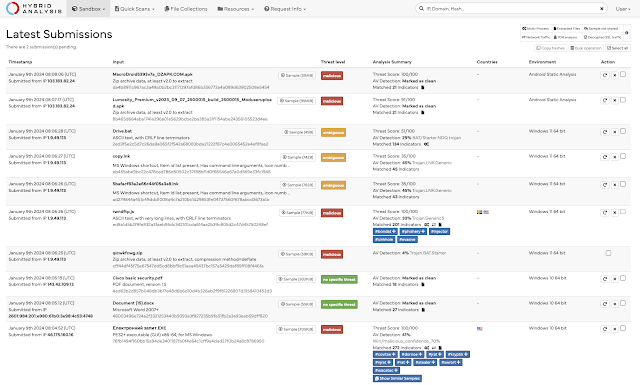
Vintage is in, but there is such a thing as hanging on to a look for too long — and the Hybrid Analysis logo was beginning to look dated. We wanted a modern look that reflects the exciting new capabilities added to the service over the past year. In addition to the new logo, the Hybrid Analysis website has been refreshed with new fonts for added visual appeal. 


These changes will become immediately apparent as you visit the homepage or navigate to any overview or report page. We’re constantly working to improve the Hybrid Analysis user experience, so through the upcoming year we plan to gently roll out new visual modifications and updates to enhance your experience with the platform.


Figure 1. Hybrid Analysis Latest Submissions page with new font and logo

Image Scanning Support for QuickScan

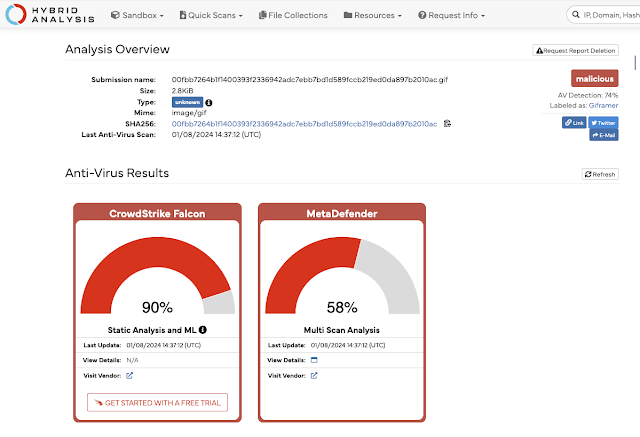
Rest assured, the new changes are not just skin-deep. We just introduced new image-scanning support for QuickScan static analysis. It's as easy as uploading a 'png', 'jpg', 'gif', 'tiff', or 'bmp' file type and hitting the Analyze button. If you’re ever in doubt whether an image file type could be carrying some concealed executable code or malware, you can instantly get an assessment from QuickScan, which performs static analysis using CrowdStrike machine learning (ML) and technologies from our partners, such as Metadefender. 


Figure 2. Hybrid Analysis QuickScan Analysis Overview for a ‘gif’ file

We Value Your Input

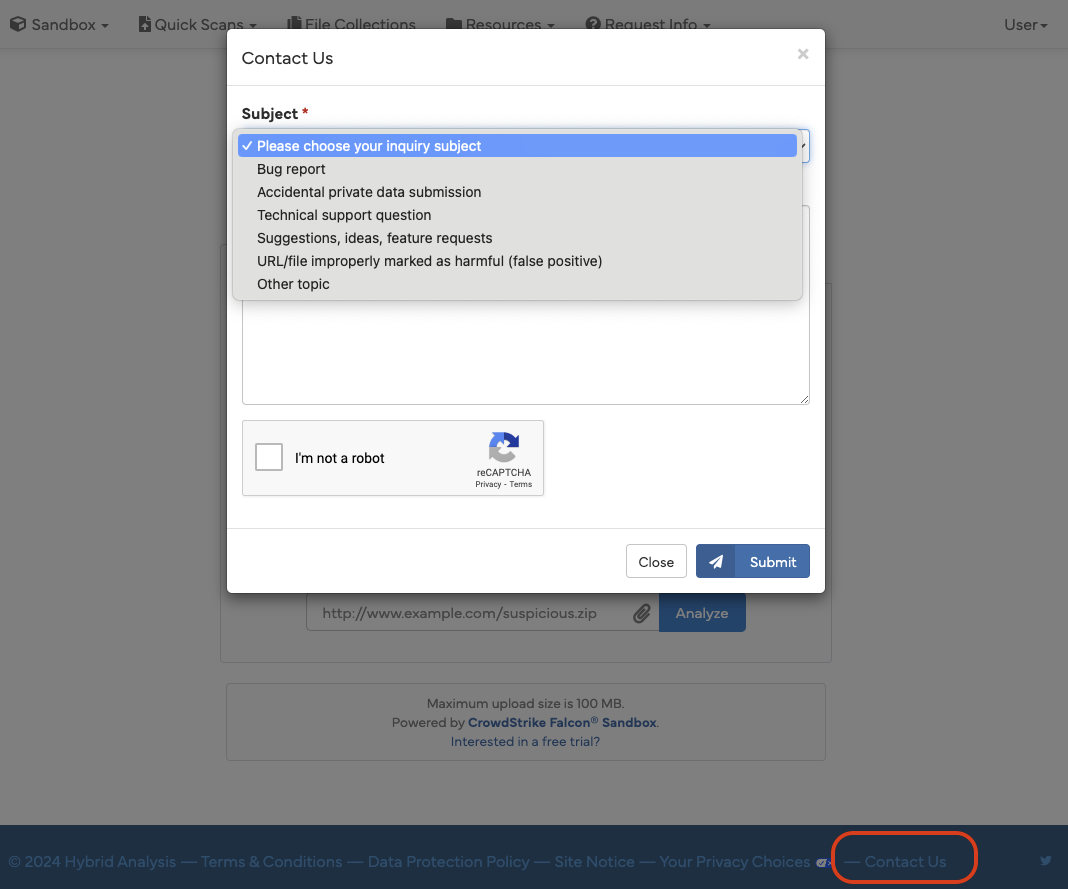
Hybrid Analysis vetted users now have the ability to conveniently ask questions, make suggestions or offer feedback about the platform. We have introduced a “Contact Us” form — found at the bottom of the webpage in the footer — so it’s easier than ever to reach out to us. Just pick one of the predefined topics from the Subject drop down list, blast us a message and we will do our best to reply to the email address associated with your Hybrid Analysis account. 


Alternatively, for those that are not vetted users and want to reach out with comments, suggestions or feedback, please feel free to drop us a line on our Hybrid Analysis X (formerly Twitter) account. Your feedback is important to us and we value your input! 


Figure 3 - Hybrid Analysis Contact Us form (available for vetted users)

The Road Ahead

We have been committed to continually improving the capabilities and the quality of the Hybrid Analysis platform by constantly adding new features, improving existing ones or in some cases, removing them.


Thank you to our users. You can look forward to continued investment in Hybrid Analysis upgrades through 2024. Expect ongoing improvements to the UI and, most importantly of all, continued enhancements to our services along with more technology partnerships to augment our capabilities for providing the best possible insights for you — the Hybrid Analysis community.


Tuesday, March 14, 2023

Hybrid Analysis Partners with ScamAdviser and CleanDNS to Provide Enhanced Context to URL and Domain Analysis

Hey everyone, we’ve got some exciting news to share! We are thrilled to announce our newest partnerships and technology integrations, with ScamAdviser and CleanDNS. These relationships will provide the Hybrid Analysis community with more context into analyzed URLs and domains. This augments our capabilities for providing the best possible insights for the Hybrid Analysis community.


We constantly strive to provide the most effective and comprehensive threat analysis platform to our community and these new integrations will enable the community to better understand threats and make more informed decisions on how to analyze or respond to them.


So, what exactly do these integrations offer our community? 

Both ScamAdviser and CleanDNS will be presented as Scorecards in the Analysis Overview section. Clicking the View Details button will open a modal with additional context and information on the analyzed domain. Apart from Domain Scam Score and Domain Abuse Reports, users also have the option of visiting each partners’s website for further details on the analyzed domain.


Fig. 1 Scorecards in the Analysis Overview section displaying the ScamAdviser and CleanDNS integration


Fig. 2 Modal view for the CleanDNS View Details button


ScamAdviser utilizes over 40 data sources such as the IP address of the web server, the availability of contact details on the website, the age of the URL and ratings on review sites. The service is designed to assist in making informed decisions regarding the scam-like behavior of URLs. Its algorithm determines whether a website is legitimate – with genuine reviews – or a phishing site selling fake products. By integrating ScamAdvisor into the Hybrid Analysis platform with its 30 million analyzed websites, we will be able to provide researchers and analysts with a more comprehensive understanding of the URLs we analyze. For more information on how the technology behind it works, feel free to check out the ScamAdviser website.


CleanDNS offers a vital solution for detecting likely sources of abuse. It is a valuable tool for assisting registries, registrars and researchers in making informed decisions to take action against such abuse. Initially informed by reputable abuse data sources including top domain abuse feeds, commercial, non-profit and academic DNS abuse feeds, CleanDNS enhances abuse records with an evidence-based workflow to create actionable reports. With CleanDNS, we can provide our community with an additional layer of context regarding the state of analyzed domains. For more information on how the technology behind it works, feel free to check out the CleanDNS website


These partnerships with ScamAdviser and CleanDNS enable Hybrid Analysis researchers and analysts to identify fraud, phishing scams, and other malicious activities. By leveraging these capabilities, we are augmenting our already powerful platform, providing the community with additional insights into the behavior of a URL or domain. We look forward to continuing to collaborate and partner with technology providers to offer additional tools and improve threat research insights for our security community.


Happy Hunting!


Tuesday, June 8, 2021

Public Service Announcement: Retiring Falcon Sandbox Public API V1 Starting August 3, 2021

We are announcing the sunset of  Falcon Sandbox Public API v1, which will reach end of life as of August 3, 2021, 12:00 PM EST. After this date, the Falcon Sandbox Public API v1 will stop responding altogether.


Here at Hybrid Analysis, we are dedicated to enabling our community to leverage a unified platform for automated malware forensics by concentrating our efforts on improving our systems to deliver the best experience, performance, features, and tools to enrich malware analysis.


Anyone visiting the Hybrid Analysis homepage has probably already seen the banner about retiring the Falcon Sandbox Public API v1, and we have already started notifying API connectors authors about version removal.


Falcon Sandbox Public API v2 has been in use for more than a year, and we’ve made great efforts to integrate existing API v1 features into API v2, while also expanding on them.


Who is Impacted?

This change impacts everyone that has been using the Falcon Sandbox Public API v1. Starting today June 8, 2021, the Falcon Sandbox Public API v1 has entered the sunset period, leading to deprecation beginning August 3, 2021,12:00 PM EST.


Anyone using the VxWebService Python API Connector v2 with the Falcon Sandbox Public API v2 will not be impacted and the code that resides in the master branch of that repository supports API v2. 


As a reminder, the legacy VxWebService app utilising API v1 is not supported anymore, but still available in the v1 branch.


Why the Change to Falcon Sandbox Public API v2?

As some of you have already noticed when using the API v2, one of the major benefits involves using OpenAPI and Swagger Docs, which have become the world standard for defining RESTful interfaces.


Data security and privacy are also something we take seriously, so the fact that Falcon Sandbox Public API v2 is also SOC II compliant is all the more critical. This means the API v2 is built around the five “trust service principles” involving security, availability, processing integrity, confidentiality and privacy.


But most importantly, with Falcon Sandbox Public API v2 we can readily and constantly roll out new features that can help you, the research community, expand on analysis capabilities while offering a reliable API standard that’s easy to use.


For a complete list of features and functionalities we have added over time into the Falcon Sandbox Public API v2, check out our API v2 changelog section (here)


How to Successfully Migrate to Falcon Sandbox Public API v2?

Throughout the sunsetting phase, those who still use the API v1 are encouraged to switch to the API v2 by following the instructions we have put together (here).


If you have any automation dependencies running on Falcon Sandbox Public API v1, please make the necessary changes and switch to Falcon Sandbox Public API v2 using the available documentation.


We hope this graceful transition will not bring too much disruption to your activities. If you experience any issues with the migration process or if you have suggestions on new features that you would like to have available, please let us know.


Happy Hunting!